Who calls whom
The JOpt Platform stack runs JOpt.TourOptimizer in auth mode. It has one front door, TourOptimizer, and a fixed direction of calls between its components. This page shows that direction and how sign-in and the tenant work. What happens to a job after its checks is the same in both modes and is described on Jobs. The components are listed in the JOpt Platform overview.
The direction of calls
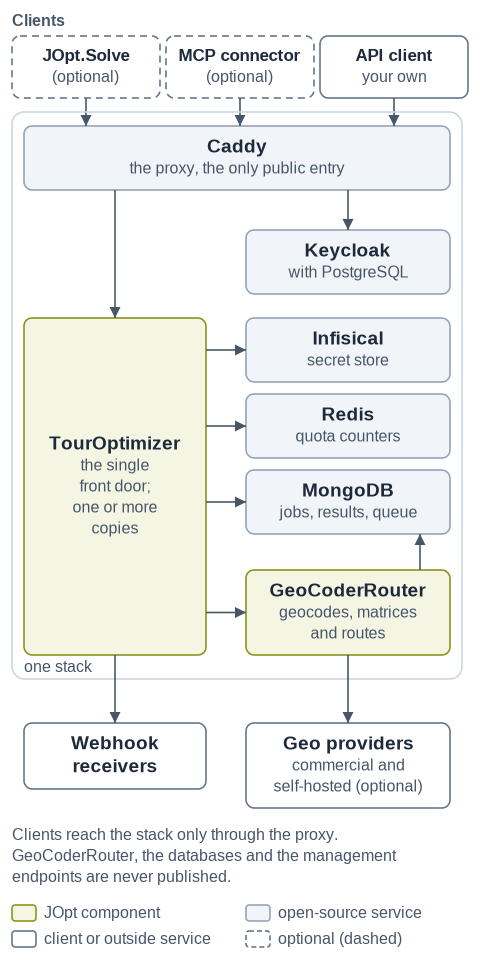
The diagram opens full size on click.
- Clients reach the stack only through the proxy. A client is JOpt.Solve, the MCP connector or an own API client.
- The proxy sends sign-in requests to Keycloak and API requests to TourOptimizer. It spreads the API requests over the TourOptimizer copies and sends each one to the least busy copy.
- TourOptimizer is the single front door. It checks the token, reads the settings and secrets of the tenant from the secret store, keeps jobs, results, the queue and the usage records in MongoDB, counts quotas in Redis, and asks GeoCoderRouter for geocodes, matrices and routes.
- GeoCoderRouter is internal. Only TourOptimizer calls it, and it never calls TourOptimizer. It keeps its cache in MongoDB and calls the geo providers.
- JOpt.Solve and the MCP connector are clients of the TourOptimizer API only. They never call GeoCoderRouter or the JOpt core directly.
- Of the JOpt services, only TourOptimizer (for completion webhooks) and GeoCoderRouter (for the geo providers) send requests out of the stack. GeoCoderRouter, the databases and the management endpoints are never published.
Sign-in and tenant
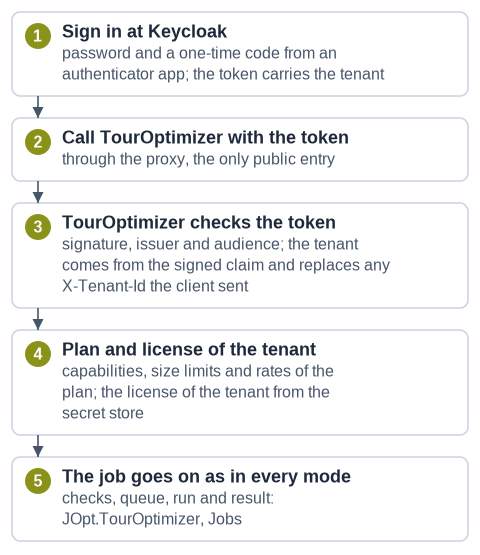
The diagram opens full size on click.
In auth mode, a request reaches a job in these steps:
- The user signs in at Keycloak with a password and a one-time code from an authenticator app. The client receives a token that carries the tenant.
- The client calls TourOptimizer with that token, through the proxy, the only public entry of the stack.
- TourOptimizer checks the signature, the issuer and the audience of the token. It takes the tenant from a signed claim of the token. A header
X-Tenant-Idthat the client sent is replaced by that tenant. - TourOptimizer applies the plan of the tenant: its capabilities, size limits and rates. The JOpt license of the tenant comes from the secret store of the stack. A failed check refuses the request with an HTTP status and a reason code (Checks and limits).
- From here the job goes on as in every mode: it is stored, queued, run and read (Jobs).
In trusted mode, steps 1 to 4 are the task of your own backend: it sends the tenant in X-Tenant-Id and the license with the job or as the default of the server (Trusted Mode).
Related pages
- JOpt Platform overview: the components, their images and what is optional
- GeoCoderRouter: geocoding, matrices and routes inside the stack
- Jobs: the queue, the copies, webhooks and stored results
- Checks and limits: what TourOptimizer refuses and why
- Platform operations: copies, health, metrics, logs, backups and the release flow of the images
Added: 2026-11-27 | Last updated: 2026-11-27
JOpt Platform overview
The JOpt Platform stack that runs JOpt.TourOptimizer in auth mode, its components, their container images and the open-source building blocks it runs on.
JOpt.GeoCoderRouter
JOpt.GeoCoderRouter, the geo service of the JOpt Platform, which today runs only inside the JOpt Platform stack, for geocoding, distance and driving-time matrices and turn-by-turn routes.