Overnight Stay
Multi-day routing with stay-out policies, recovery rules, and per-shift control
Many real routing problems cannot be solved with day trips alone. Field service across large regions, multi-day deliveries, seasonal campaigns, and long-haul tours all require a resource to stay overnight at a location and continue the next morning from that position instead of returning home.
JOpt.TourOptimizer supports overnight stays as a deeply integrated routing feature. The optimizer decides where a resource stays, on which nights, and for how long. This is not a post-processing step. The stay decisions are part of the optimization itself, jointly optimized with routing, scheduling, and all other constraints.
What makes this feature production-grade is the policy system. You control overnight stays at multiple levels: per day (via WorkingHours), per resource (via distance/time thresholds), and across multi-day sequences (via consecutive-night limits and mandatory recovery periods). The result is a planning model that respects both operational efficiency and employee wellbeing regulations.
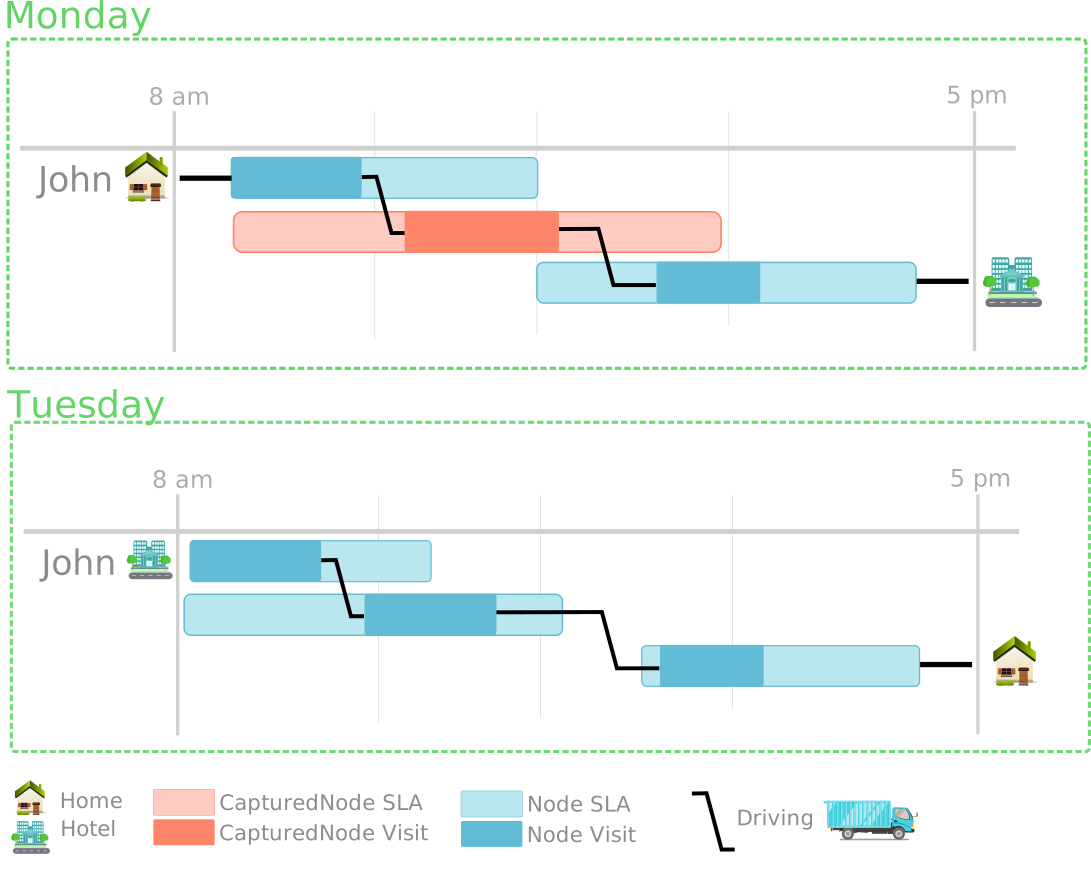
Figure: A resource stays at a hotel instead of returning home. The next day starts from the overnight position.
Overview
- Core concepts
- Stay nodes
- Per-day control via WorkingHours
- Stay-out policy: distance and time thresholds
- Consecutive nights and recovery
- Usage example
- What changes in the plan
- Modeling guidance
- Closing words
Core concepts
The overnight stay system has two sides:
Node side (stay nodes). A node can be marked as eligible for overnight positioning. This means the resource may end its working day at this node and continue from that position the next morning. Not every node should be a stay node. Typical candidates are hotels, depots, service bases, partner hubs, or safe parking areas.
Resource side (policies and restrictions). The resource controls whether, when, and how often it is allowed to stay out. This is modeled through three mechanisms that work together:
- Per-day allowance on individual WorkingHours
- A distance/time policy threshold that determines when staying out becomes justified
- Multi-day restrictions on consecutive nights out and mandatory recovery time
Stay nodes
A node becomes a stay node by calling setIsStayNode(true):
TimeWindowGeoNode hotel = new TimeWindowGeoNode(
    "Hotel Innsbruck", 47.2654, 11.3927, openingHours, Duration.ofHours(1), 1);
hotel.setIsStayNode(true);
Stay nodes are regular nodes in every other respect. They have opening hours, visit durations, qualifications, and constraints. The stay flag simply adds the eligibility for overnight positioning.
A node can be both a stay node and an optional node. This is useful for hotel nodes that the optimizer should visit only if staying out is beneficial. If the tour does not justify an overnight stay, the optional hotel node is skipped.
The optimizer uses stay nodes as candidate overnight positions and selects the one that produces the best multi-day plan. If no stay node is reachable or beneficial, the resource returns home as usual.
Per-day control via WorkingHours
By default, every WorkingHours entry is not available for overnight stay. This is an intentional opt-in design: overnight stays are a significant operational decision and should be consciously enabled, not accidentally inherited.
To allow staying out on a specific day, call setIsAvailableForStay(true) on the corresponding WorkingHours:
// Enable overnight stay for all working days
workingHours.forEach(w -> w.setIsAvailableForStay(true));

// But forbid it on Friday (resource must return home for the weekend)
workingHoursFriday.setIsAvailableForStay(false);
This per-day control is powerful. You can model:
- Weekday stays allowed, weekend return mandatory
- Specific days blocked for maintenance, rest, or depot duties
- Seasonal patterns where stays are allowed only during campaign periods
- Individual agreements per resource (some drivers stay out, some do not)
The granularity is at the WorkingHours level, not the resource level. A resource with six working days can have stays enabled on four of them and disabled on two, without any custom constraint logic.
Stay-out policy: distance and time thresholds
Not every tour justifies an overnight stay. A resource working 30 minutes from home should return home, not check into a hotel. The stay-out policy defines minimum thresholds based on the connection back to the home location:
Quantity<Length> minDistance = Quantities.getQuantity(100, KILO(METRE));
Duration minTime = Duration.ofHours(2);

resource.setStayOutPolicy(minDistance, minTime);
resource.setStayOutPolicyReturnDistanceActive(true);
The policy says: allow overnight stays only if the resource's current position is at least 100 km away from home or the driving time back to the home location would be at least 2 hours. In other words, if the resource needs more than 2 hours of driving to get home, staying out is permitted. The ReturnDistanceActive flag tells the optimizer to consider the return distance/time as part of the stay-out decision.
This prevents unnecessary hotel costs for local tours while allowing stays when the tour genuinely requires multi-day coverage.
Consecutive nights and recovery
For employee wellbeing and regulatory compliance, the system supports restrictions on how many consecutive nights a resource can stay out and how long the recovery period at home must be:
int totalStaysOut = -1;   // unlimited total nights out (-1 = no limit)
int staysOutInRow = 4;    // after 3 consecutive nights out, return is required
int minRecoverHours = 2;  // recovery at home must last at least 2 nights

resource.setStaysOut(totalStaysOut, staysOutInRow, minRecoverHours);
The three parameters:
Total stays out. The maximum number of overnight stays across the entire planning horizon. Set to -1 for unlimited. Use a positive value to cap the total hotel budget.
Stays out in a row. The maximum number of consecutive nights out before the resource must return home. In the example, staysOutInRow = 4 means after 3 consecutive nights away, the 4th night must be at home. This models weekly return policies common in field service and long-haul transport.
Minimum recovery hours. The minimum duration the resource must spend at home before being allowed to stay out again. In the example, minRecoverHours = 2 requires at least 2 consecutive nights at home before the next multi-day tour can begin. This models mandatory rest periods required by labor regulations or company policy.
These restrictions interact with the per-day WorkingHours settings. A day marked as setIsAvailableForStay(false) forces a return regardless of the consecutive-night counter. The two mechanisms provide overlapping control: WorkingHours for calendar-based rules, setStaysOut for sequence-based rules.
Usage example
The example models a multi-day field service tour across Europe. A resource named Jack starts from his home location near Aachen and must visit nodes in Zagreb, Venice (optional), Innsbruck, Vienna, and Mannheim over a 6-day planning horizon (May 6 to 11).
The configuration:
- All six WorkingHours entries are explicitly enabled for overnight stays
- Stay-out policy: minimum 100 km distance or 2 hours driving time back to home
- Consecutive nights: unlimited total, maximum 3 in a row, 2 nights recovery
- Major nodes are marked as stay nodes
- Venice is both optional and a stay node
The optimizer produces a multi-day plan where Jack visits nodes in geographic order, stays at hotel locations between days, and returns home after the consecutive-night limit is reached.
// Multi-day working hours
List<IWorkingHours> workingHours = new ArrayList<>();
for (int day = 6; day <= 11; day++) {
    workingHours.add(new WorkingHours(
        ZonedDateTime.of(2020, MAY.getValue(), day, 8, 0, 0, 0, ZoneId.of("Europe/Berlin")),
        ZonedDateTime.of(2020, MAY.getValue(), day, 20, 0, 0, 0, ZoneId.of("Europe/Berlin"))));
}

// Enable overnight stays for all days
workingHours.forEach(w -> w.setIsAvailableForStay(true));

// Create resource with policies
CapacityResource jack = new CapacityResource(
    "Jack", 50.775346, 6.083887, maxWorkingTime, maxDistance, workingHours);

// Stay-out policy
jack.setStayOutPolicy(
    Quantities.getQuantity(100, KILO(METRE)),
    Duration.ofHours(2));
jack.setStayOutPolicyReturnDistanceActive(true);

// Consecutive-night restrictions
jack.setStaysOut(-1, 4, 2);
What changes in the plan
Without overnight stays, a Europe-wide tour would violate working time limits, force unrealistic scheduling, or require the resource to "teleport" home each evening. The optimizer either produces an infeasible result or drops nodes that cannot be reached in a single day.
With overnight stays enabled:
- The optimizer splits the tour across multiple days with natural day boundaries
- Each day ends at a stay node (hotel, depot, or service base)
- The next day starts from the overnight position, not from home
- WorkingHours and OpeningHours are respected across the multi-day sequence
- The stay-out policy prevents unnecessary hotel stays for short tours
- Consecutive-night limits and recovery rules are enforced automatically
Modeling guidance
Mark realistic overnight points as stay nodes. Do not mark every customer node as a stay node. Typical candidates are hotels, depots, service bases, partner hubs, and safe parking areas. Unrealistic stay nodes produce plans that look optimal on paper but are impractical to execute.
Use policy thresholds to avoid unnecessary stays. Calibrate the minimum distance and time thresholds based on your real operations. If your drivers typically return home for tours under 150 km, set the threshold accordingly.
Enforce consecutive-night limits for compliance. Labor regulations in many industries limit how many nights a worker can spend away from home. Use setStaysOut to model these rules natively rather than checking compliance after the fact.
Control stay availability per day. Use setIsAvailableForStay(false) on specific WorkingHours to enforce calendar-based return rules (weekends, rest days, maintenance days). This is cleaner and more explicit than trying to model the same behavior through time window constraints.
Give stay nodes realistic time windows. Stay nodes still use OpeningHours. If the time windows are too strict, the optimizer may not be able to use them as overnight positions. Hotels and depots typically have wide windows.
Consider downstream systems. Multi-day routing requires support in route execution apps, reporting, and dispatch communication. Ensure your workflow can handle day boundaries, overnight locations, and per-day route segments.
Closing Words
Overnight stays in JOpt.TourOptimizer are not a simple "open route" flag. They are a fully productized feature with per-day control via WorkingHours, distance/time policy thresholds, consecutive-night limits, and mandatory recovery periods. The optimizer jointly decides where to stay, when to return home, and how to sequence multi-day tours while respecting all policies and constraints.
For related concepts, see Overnight Stay in Special Features and the Return to Start feature guide for single-day route termination behavior.
Authors
A product by dna-evolutions ©
Optimization Properties
Setting properties will influence the way the Optimizer is finding a solution to a problem set. By default, the optimization properties are tuned to solve most of the use-cases. It is recommended to keep the default properties as much as possible. However, some properties need to be set. Especially, properties that influence the runtime or the filtering ability of the Optimizer are set usually on startup and are adjusted to meet the user requirements.
Performance Mode