Comparison tool for optimization results

This guide describes the comparison tool of JOpt: you change an existing optimization result, for example by swapping the order of two nodes, and compare the original and the modified result by cost and by constraint violations. It is written for developers who use JOpt as a Java library and need to explain or check a result. If you are new to JOpt.TourOptimizer, start with the first optimization tutorial.
Table of contents
Before you start
- JOpt in your Java project, as a Maven dependency or as a JAR file; see Getting started.
- A JDK in the version that the examples pom sets.
- A license if your optimization has more elements than JOpt allows without one: License guide: element limits.
What it does
An optimized result can look worse to a person than it is. The optimizer weighs constraints such as time windows, skill requirements and visitor restrictions, while customers often prefer routes that are geographically short and look clean on a map. Two concerns come up often:
- Geographical crossings: a route does not follow the shortest path, because a constraint requires another order.
- Route splitting: the optimizer spreads the work over more than one route to reduce overtime.
The comparison tool lets you test such a concern in four steps:
- Modify the optimization result, for example by swapping the visit order of two locations or by moving nodes to another route.
- Compare the original and the modified result.
- Weigh the trade-offs, for example a shorter distance against a late arrival.
- Generate a report that lists the cost differences and the constraint violations.
Example: Duisburg before Krefeld
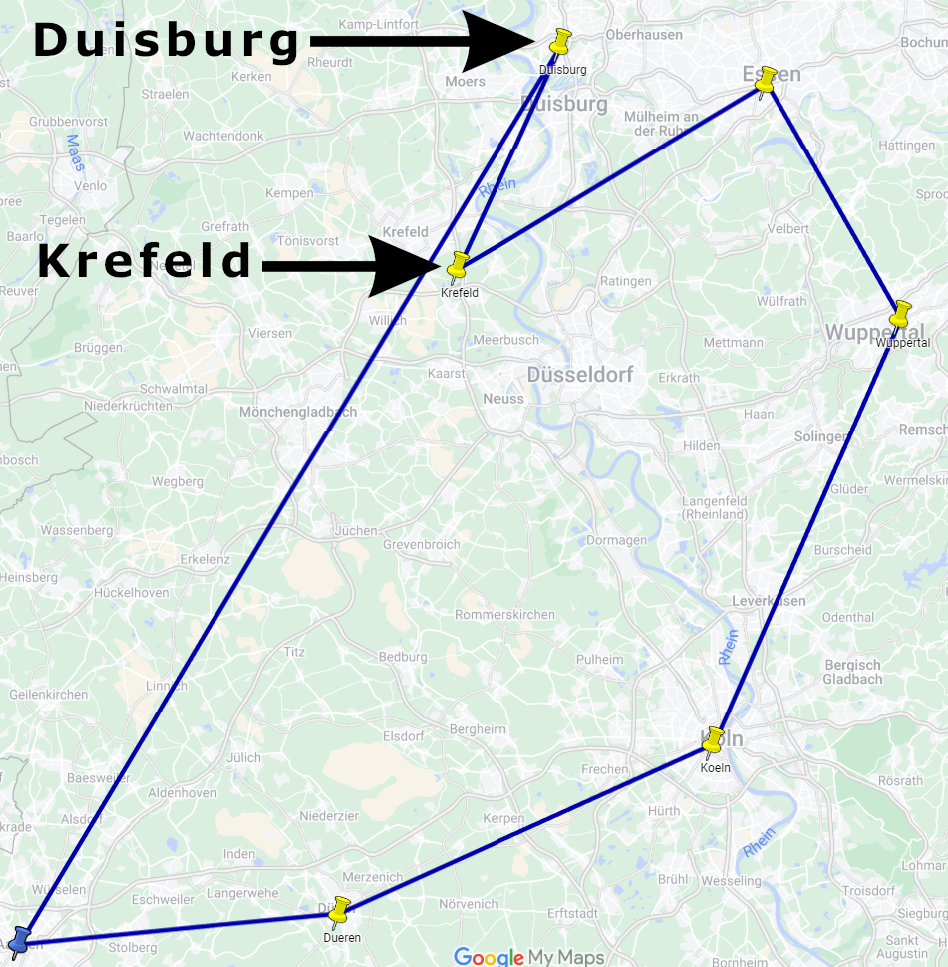
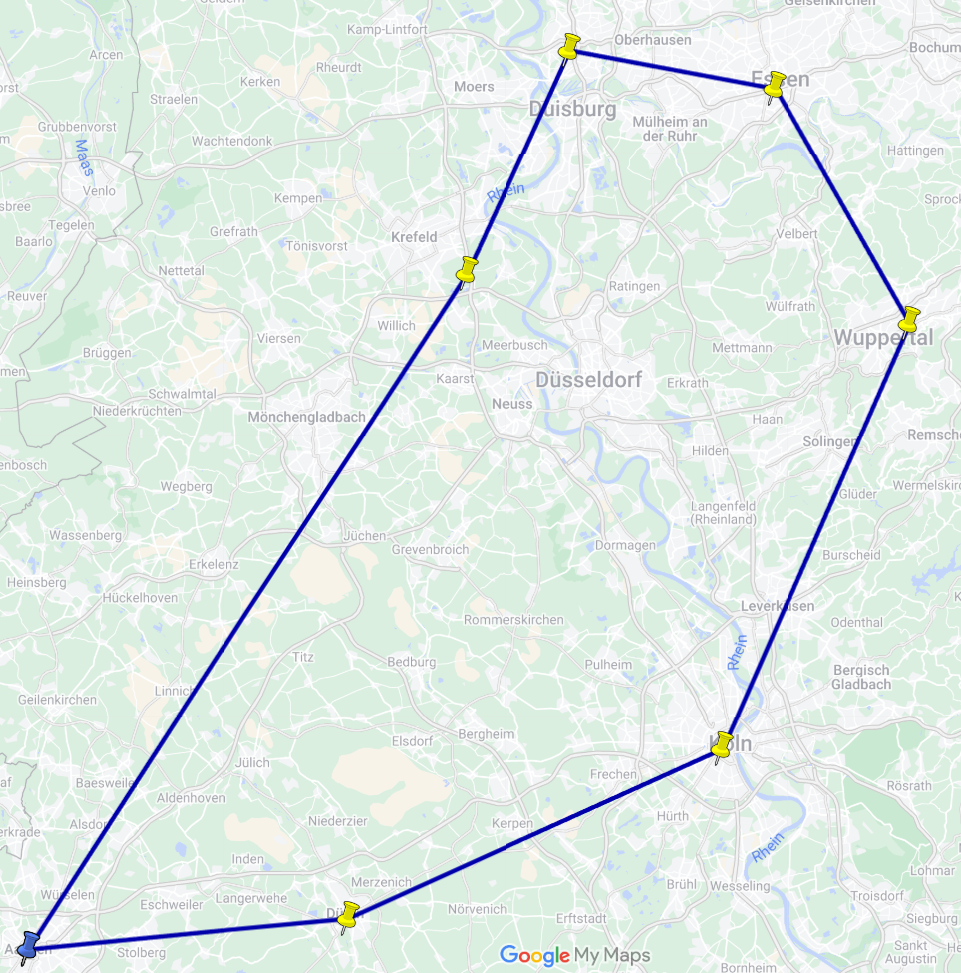
In the node exchange example, the optimization result visits Duisburg before Krefeld, although the opposite order looks shorter on the map. A customer may ask why Duisburg comes first. In the example, Duisburg has a shorter opening time window than the other nodes.
The figures below are sample values.
The original result visits Duisburg before Krefeld. The total distance is 272 km, and there are no late violations.
The modified result swaps Duisburg and Krefeld. The total distance is 238 km, 34 km less, but the visit at Duisburg ends 24.5 minutes after Duisburg closes.
| Metric | Original route | Modified route | Difference |
|---|---|---|---|
| Total distance | 272 km | 238 km | -34 km |
| Late violations | 0 min | 24.5 min | +24.5 min |
| Total cost | 306.71 | 316.39 | +9.68 |
The original result has the lower cost: it avoids the late visit and accepts the longer distance.
When to use it
Use the comparison tool when a person questions a result, for example:
- "Why does the route cross this region multiple times?"
- "Can't the optimizer keep all jobs in a single route?"
- "Would swapping two locations reduce travel time?"
The optimizer looks for the solution with the lowest cost, which customers may perceive differently. With the comparison tool, a customer modifies a solution as their intuition suggests and compares it with the optimizer's result. The report shows why the optimizer chose its result. If the modified solution has the lower cost, the original run may have had too little computation time, or the model may miss a constraint or weigh one wrongly.
Other changes to compare: a different node visit order, a route split or a different distribution of work.
How to use it
The code below follows the comparison examples. exchangeNodes, createModResult, applyTasksAndCreateModResult and compareResults are helper methods of the examples.
Step 1: Modify an existing result
The helper exchangeNodes swaps the order of two locations. It wraps an ExchangeOptimizableNodesModificationTask in a list of IModificationTask and applies the list with the helper applyTasksAndCreateModResult, which calls OptimizationResultModificationWrapper.getNewResult(opti, tasks). A MoveOptimizableNodeModificationTask moves nodes to another route instead (the node move example).
private static IOptimizationResult exchangeNodes(
    IOptimization opti, String nodeOneId, String nodeTwoId)
    throws InterruptedException, ExecutionException, InvalidLicenceException, IOException,
    ConvertException, SerializationException {
  IModificationTask exchangeTask =
      new ExchangeOptimizableNodesModificationTask(nodeOneId, nodeTwoId);

  List<IModificationTask> tasks = new ArrayList<>();
  tasks.add(exchangeTask);

  return applyTasksAndCreateModResult(opti, tasks);
}
Called with Krefeld and Duisburg, it swaps the two nodes of the original route.
Step 2: Create the modified result
After the optimization run, the example creates the modified result with createModResult(this). The run itself prints the original result under RESULT ORG; createModResult prints the modified one:
private static IOptimizationResult createModResult(IOptimization opti)
    throws InterruptedException, ExecutionException, InvalidLicenceException, IOException,
    ConvertException, SerializationException {
  // Customers often ask why Duisburg comes before Krefeld; the swap shows what the other order
  // costs.
  IOptimizationResult modResult = exchangeNodes(opti, "Krefeld", "Duisburg");

  String banner = "#########################  RESULT MOD  #########################";
  System.out.println("\n\n\n" + banner + "\n\n\n");
  System.out.println(modResult);

  return modResult;
}
The node move example takes the original result as a second argument, because it reads the nodes of the second route from it.
Step 3: Compare the original and the modified result
JobAdvantagesController.compare compares both results and returns a JobAdvantageResult if they are structurally comparable. A CostAdvantageInterpreter turns it into a text report:
protected static void compareResults(
    IOptimizationResult orgResult, IOptimizationResult modResult)
    throws ResultStructureNotMatchingException {
  Optional<JobAdvantageResult> comparisonResultOptional =
      JobAdvantagesController.compare(orgResult, modResult);

  if (comparisonResultOptional.isPresent()) {
    JobAdvantageResult comparisonResult = comparisonResultOptional.get();

    ICostAdvantagesInterpreter myInterpreter = new CostAdvantageInterpreter();

    System.out.println(
        "\n\n\n#########################  COMPARISON RESULT  #########################\n\n\n");
    System.out.println(myInterpreter.generateTextReport(comparisonResult));
  } else {
    System.out.println("Comparison failed");
  }
}
The comparison report
After the comparison, the report summarizes the differences in five numbered parts: the job result (the cost of each whole run), the violation summaries, the restrictions sorted by their cost difference, the restrictions with the largest positive and the largest negative difference, and the routes behind those two. The job result of the node exchange example (Compare results), without its two ident lines:
Cost Base    : 306.71521617219287
Cost Compare : 316.3991459910722
Cost Diff    : -9.683929818879335
Result       : Base job has lower cost.
The route part of the report lists the distance as the restriction where the modified result has the lower cost (Cost Diff : 34.33032257339144) and the lateness as the one where the original is better (Cost Diff : -46.18157322560417): the modified route is 34.33 km shorter, but its late visit at Duisburg costs more than the distance saves. Cost Diff is the cost of the base result minus the cost of the compared result, so the table above shows the same difference as +9.68.
Limits
The comparison needs two structurally comparable results, such as an original result and a result modified from it. JobAdvantagesController.compare declares a ResultStructureNotMatchingException, and the code above prints "Comparison failed" when no JobAdvantageResult comes back.
Related examples
- Compare result: the node exchange and the node move examples explained
- CompareResultsWithNodeExchangeExample.java: swaps two nodes and compares the results
- CompareResultsWithNodesMoveExample.java: moves nodes from one route to another and compares the results
- CompareResultExampleOptimization.java: the shared setup and the helper methods of both examples
Related pages
- First optimization: a complete optimization run, the starting point for a comparison
- Optimization properties: the property keys by category, with their defaults, among them the
JOptWeightkeys that set the cost of a violation - Expert examples: the expert examples by topic
Authors
DNA Evolutions GmbH
Added: 2026-01-03 (JOpt core 7.5.2-j17) | Last updated: 2026-10-23
CO2 emission
How JOpt.TourOptimizer calculates the CO2 emission per route and overall, how to set an emission factor per vehicle, and how to make CO2 part of the optimization goal.
Flexible start time
FlexTime and StartReductionTime in JOpt turn the fixed start of a resource's working hours into a bounded time window: FlexTime shifts it later, StartReductionTime earlier for driving.