MagnetoCondition (MagnetoNodeConstraint)

This guide describes MagnetoCondition, implemented as MagnetoNodeConstraint: a soft preference that keeps selected nodes on the same route as a magnet node or on different routes. It is written for developers who want routes that follow the logic of their dispatchers without making a plan infeasible. You need nodes and resources in a Java optimization first; see Basic elements.
Table of contents
Before you start
- JOpt in your Java project, as a Maven dependency or as a JAR file; see Getting started.
- A JDK in the version that the examples pom sets.
- A license if your optimization has more elements than JOpt allows without one: License guide: element limits.
What it does
Dispatchers look for operational acceptance: routes should look logical, match how dispatchers think and follow soft business preferences, and those preferences should not break feasibility. MagnetoCondition expresses such preferences:
- Attraction: "These nodes should be on the same route."
- Repulsion: "These nodes should be on different routes."
- An optional order preference, for attraction only: "This node should be at the front or at the back of the attracted nodes."
MagnetoCondition attaches to a single node, the magnet. That node pulls other nodes to its route or pushes them away, through preference penalties. An attraction magnet favors solutions in which the target nodes are on the same route as the magnet, and it can favor the magnet near the start or the end of the attracted nodes on that route. A repulsion magnet favors solutions in which the target nodes are on a different route than the magnet.
MagnetoCondition is soft only, because of architectural restrictions of the library: setIsHard(true) does not make it hard, it only logs a warning, and the example does not call setIsHard. The optimizer handles it through the cost of a solution.
Effect on the example routes
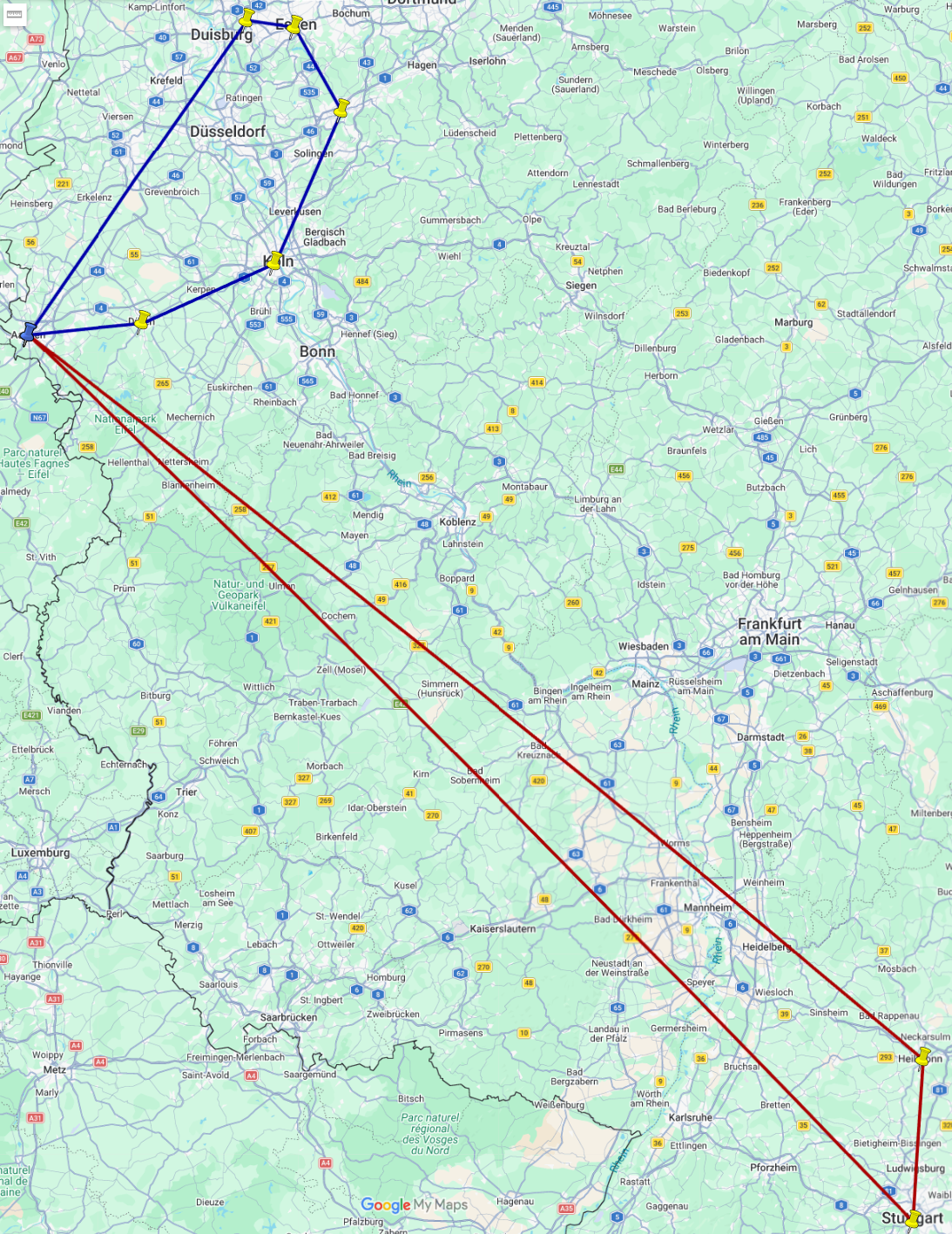
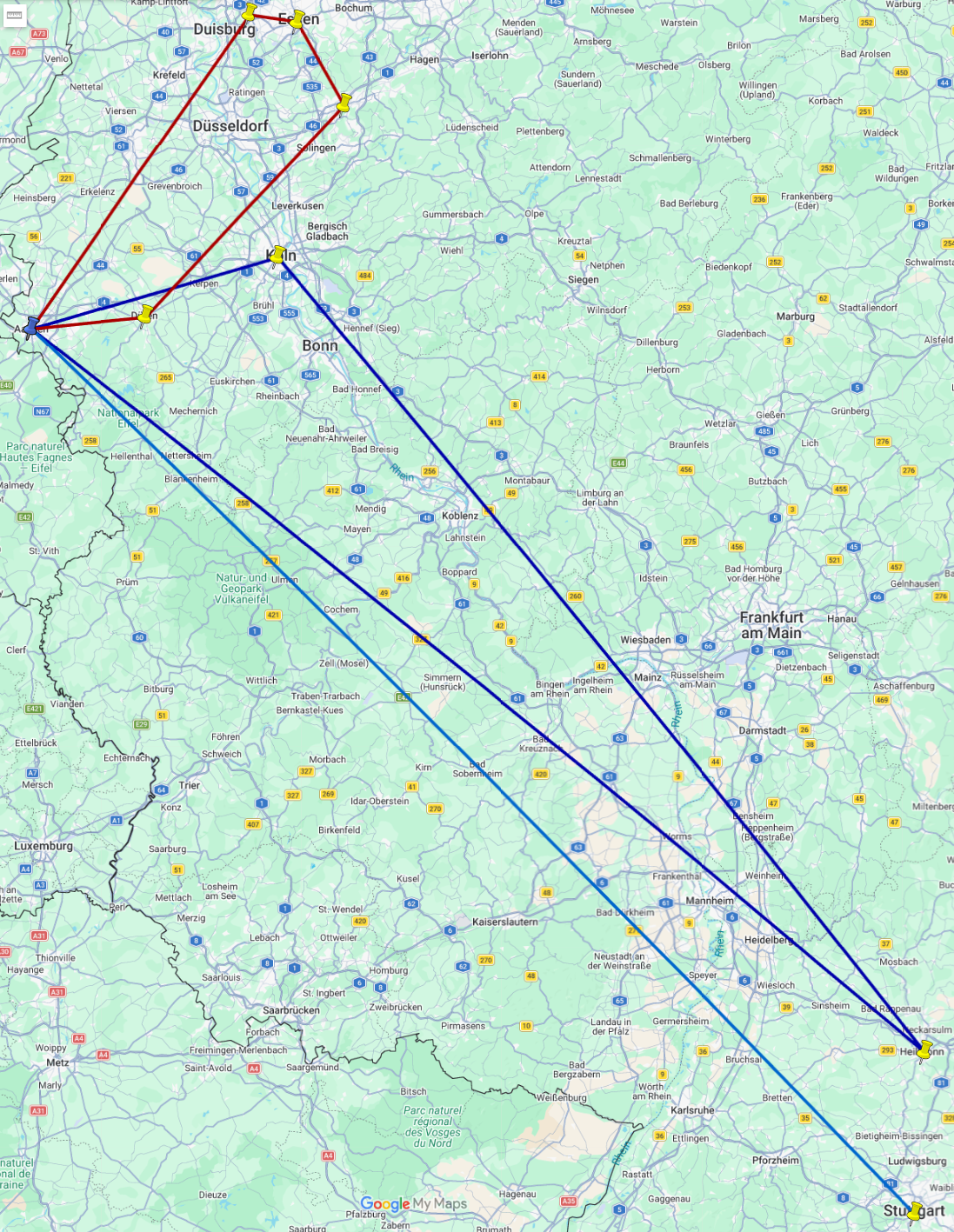
The two maps show the routes of the MagneticSoftConditionExample without and with MagnetoCondition.
Without MagnetoCondition, the routes look geographically optimal:
With MagnetoCondition, the example sets two magnets:
- An attraction magnet on Stuttgart. It adds
"Aachen"as a magnet target and sets the order preferenceNodeOrder.FRONT: Stuttgart should be at the beginning of the attracted nodes. - A repulsion magnet on Koeln. It adds
"Wuppertal"and"Essen"as magnet targets.
The desired nodes are grouped or separated:
When to use it
Typical uses of an attraction magnet:
- account owners and their priority customers;
- paired visits that dispatch wants together;
- tasks that belong together geographically or operationally, kept together softly.
Typical uses of a repulsion magnet:
- risk separation, for example two high-value deliveries;
- customer groups that should not mix;
- dangerous goods;
- tasks that cause operational friction when bundled.
Common patterns
- Keep a customer and its tasks together: an attraction magnet on customer A, with the related tasks (returns, service follow-ups) as targets, and the order
FRONTif customer A should be visited early. - Separate risky or sensitive tasks: a repulsion magnet on task X, with the tasks that must not share a route (risk, compliance preference, customer requirements) as targets.
- Route anchor: an attraction magnet on a checkpoint node, with a small group of tasks as targets and the order
FRONT, so that the checkpoint is visually and operationally the start.
How to use it
The example MagneticSoftConditionExample shows every step in Java.
Step 1: Choose the magnet node
Pick the node that acts as the anchor:
- a VIP customer;
- a key inspection or checkpoint;
- a visit that should coordinate the route structure.
Step 2: Choose attraction or repulsion
Create a MagnetoNodeConstraint. It is always soft and needs no call to setIsHard. Ask whether you want the nodes together (attraction) or apart (repulsion). setIsAttractingMagnet(true) on the MagnetoNodeConstraint sets attraction, setIsAttractingMagnet(false) sets repulsion.
Step 3: Define the target IDs
Add the IDs of the nodes that the magnet attracts or repels with addNodeMagnetId("..."). Targets are referenced by node IDs. Use stable IDs, such as order IDs, customer IDs or task IDs, not labels.
Keep the list small and meaningful. MagnetoCondition is meant for specific coordination rules, not for broad clustering; for that, use clustering during construction.
Step 4: Attach the constraint to the magnet node
Attach the constraint with addConstraint to exactly the node that acts as the magnet.
Step 5: Set an order preference (optional, attraction only)
setOrder sets where the magnet should appear among the attracted nodes on its route:
NodeOrder.FRONT: the magnet node should be the first node of the attracted nodes.NodeOrder.BACK: the magnet node should be the last node of the attracted nodes.NodeOrder.NO_ORDER: no order preference. This is the default.
FRONT and BACK are useful for anchor tasks: a VIP customer that should come first, a first checkpoint that should come first, or a last drop-off at the end. Use them only for a real business reason; otherwise leave the order at NO_ORDER.
Limits
- Do not use magnets to enforce hard business rules. If something must never happen, model it as a hard constraint, which the optimizer fulfills by its architecture.
- Avoid large target lists. For broad grouping, use clustering during construction or territories with ZoneCodes.
- Magnets are preferences, not guarantees. If time windows, skills or working hours conflict with a magnet, the optimizer may violate the magnet to remain feasible and to lower the total cost.
Related examples
- Magnetic soft condition: the example explained, with what to look for in the result
- MagneticSoftConditionExample.java: attraction with an order preference and repulsion in one run
Related pages
- Relations: hard same-route and different-route relations between nodes, the hard counterpart of magnets
- Clustering during construction: the default construction algorithm, which groups nodes into routes for the starting solution
- ZoneCodes: territories for resources and nodes
Added: 2026-02-27 (JOpt core 7.5.3-j17) | Last updated: 2026-10-23
JOpt sandboxes
The JOpt sandboxes for the Java SDK and the REST client examples, the JOpt.TourOptimizer REST endpoint they call, and the two integration paths
Manufacturing planning
How the FlexLoads of the JOpt pickup and delivery module let the optimizer decide production quantities together with routes and schedules.