Pillar Nodes (CapturedNodes)
Guaranteed SLA matching through hard constraints by architecture
One of the most challenging tasks in route and schedule optimization is to avoid SLA violations. In JOpt.TourOptimizer, an SLA of a Node is called an OpeningHour with a particular TimeWindow. Usually, optimizers try to position Nodes most optimally, sometimes even violating SLAs depending on the cost-benefit ratio. But how do you tell an optimizer that being 10 minutes late at one Node is fine, but for another Node, it is not acceptable?
Most optimizers address this by assigning extremely high cost penalties. In JOpt, we take a fundamentally different approach: a hard constraint is an architectural property, not a cost property. The optimizer's architecture is designed so that hard constraints cannot be violated. The search space is structurally cut to exclude invalid solutions.
A CapturedNode (also called a Pillar or PillarNode) is the primary mechanism for this. Its OpeningHours cannot be violated under any circumstances. Other nodes in the schedule flow around the Pillar. They shift, reorder, or move to different resources to keep the Pillar's time window intact.
Overview
- Why not penalties?
- How Pillars work
- Conflict resolution
- Illustrated conflict cases
- Node types and mandatory resource
- Usage example
- Modeling guidance
- Closing words
Why not penalties?
Penalty-based "hard" constraints are pseudo constraints. They are expensive soft constraints pretending to be hard. In practice, three things go wrong as problem complexity grows:
- The optimizer wastes its budget. The search algorithm spends most of its capacity satisfying inflated penalty terms instead of optimizing the actual schedule. Soft constraints like travel time, overtime, and fairness are starved.
- Pseudo-hard constraints fight each other. With dozens of penalty-based "hard" constraints competing in the same cost function, the optimizer trades violations between them. A solution that violates one SLA to save another is "optimal" by the numbers but unacceptable for the business.
- There is no guarantee. A sufficiently complex problem will find ways to violate even very high penalties. A cost function cannot reliably distinguish "preferred" from "legally required."
This limitation was not theoretical. It was reported by customers running large-scale field-service operations with thousands of daily dispatches and contractual SLAs. As their problem complexity grew, penalty-based solvers produced increasingly problematic results. The motivation for Pillar Nodes came directly from these real-world scenarios.
How Pillars work
A Pillar acts as a fixed anchor in the route timeline. Its OpeningHours are treated as absolute feasibility boundaries:
- The visit must be placed within the time window.
- The Pillar can optionally move within its window, or be fully constrained to a specific slot.
- In all cases, the window boundaries are inviolable.
- Arriving outside the Pillar's time window is structurally impossible. The optimizer will not generate such a solution.
This is a direct consequence of JOpt's attempt-based architecture. Every possible permutation of nodes and resources will lead to a valid solution. The optimizer effectively cuts the solution space for invalid solutions. In return, every solution it can find is valid: not necessarily converging or at optimal costs, but not containing any hard constraint violations.
Because hard constraints are a property of the data (not a parameter of the cost function), they never compete with soft constraints. Soft constraints optimize freely within the feasible space that hard constraints have already defined. The two layers are fully separate.
Conflict resolution
When a Pillar conflicts with other nodes, the optimizer follows a strict hierarchy:
- Reorder or shift normal nodes so the Pillar SLA is met. Normal nodes are repositioned earlier or later in the timeline.
- Accept soft violations on normal nodes. If a normal node must be late to protect the Pillar, that is a valid trade-off handled by the cost function.
- Move work to other resources. If the current resource cannot serve both the Pillar and a conflicting node, the optimizer reassigns the normal node to another resource.
- Cancel the Pillar rather than violate it. In extreme cases where no feasible schedule exists, the Pillar is removed from the plan. Contract cancellation is preferred over contract violation. This is damage control by design.
The following cases illustrate how the optimizer resolves each type of conflict. In these examples, John is a Resource with WorkingHours, Nodes are shown in light blue (OpeningHours) with dark blue task duration, and CapturedNodes are shown in orange.
Case 1: No conflict
In the usual case, matching OpeningHours to the WorkingHours of a Resource is unproblematic. Visiting CapturedNodes and Nodes in the same route does not cause any conflicts, and the CapturedNode behaves like a normal Node.
John can visit both Nodes within their OpeningHours and finish the tasks. Fitting the CapturedNode is not causing any violations.
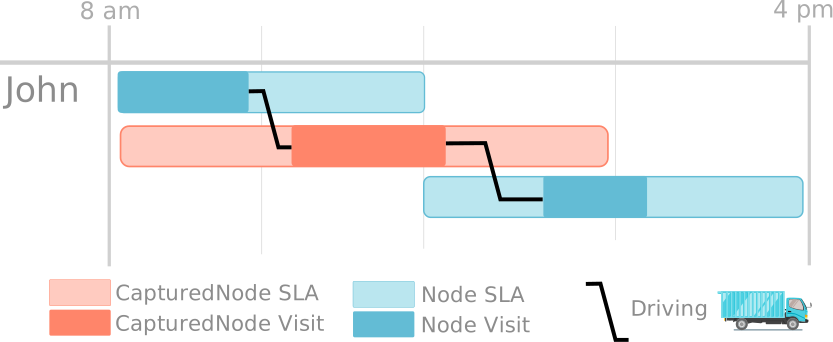
Figure: CapturedNode 1 - No conflict
Case 2: Conflict solved by moving a Node
In some cases, visiting a Node before a CapturedNode would lead to a late-violation at the CapturedNode. The optimizer recognizes the potential late-violation and solves it by repositioning the Node.
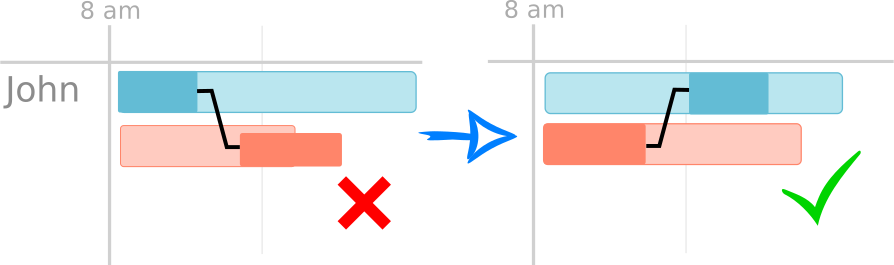
Figure: CapturedNode 2 - Solved by moving a Node (left: before, right: after)
Case 3: Conflict solved via late-violation at the Node
Sometimes a Node and a CapturedNode conflict in the sense that only one of them can be visited without a late-violation. By definition, late-violations at CapturedNodes are not allowed. The optimizer therefore accepts a late-violation at the normal Node to protect the CapturedNode.
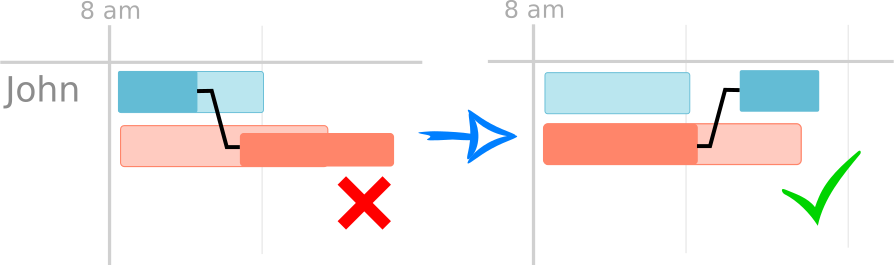
Figure: CapturedNode 3 - Late-violation accepted at the normal Node
Case 4: Conflict solved by utilizing an additional Resource
In bigger problem sets, more Resources are usually available. Often, the most optimized way to solve a conflict is to move a conflicting Node to another Resource. Which Node stays within John's route depends on factors such as driving times, required skills, or the (optional) mandatory Resource assignment.
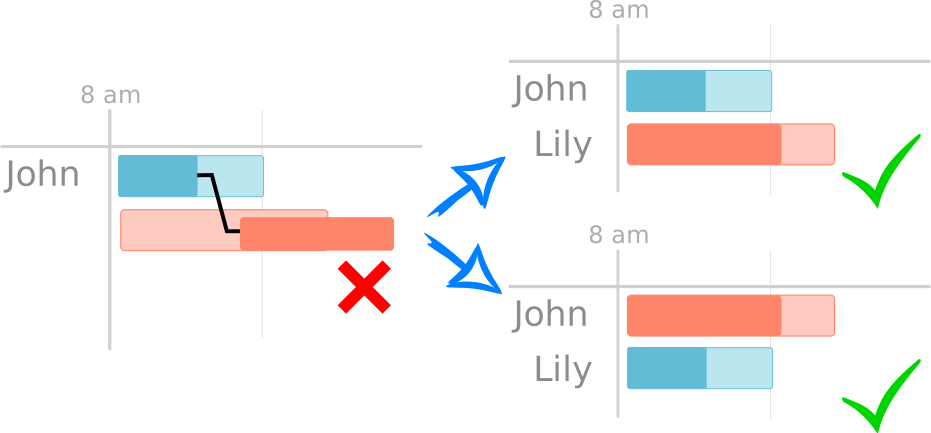
Figure: CapturedNode 4 - Solved by reassigning a Node to another Resource
Case 5: Conflict solved by removing a CapturedNode
Assuming John is the only available Resource for visiting two CapturedNodes that conflict with each other, the only possible solution is to remove one of the CapturedNodes. This illustrates an extreme case: SLAs of CapturedNodes cannot be violated under any circumstances. If no other solution is viable, a CapturedNode contract is canceled rather than violated.
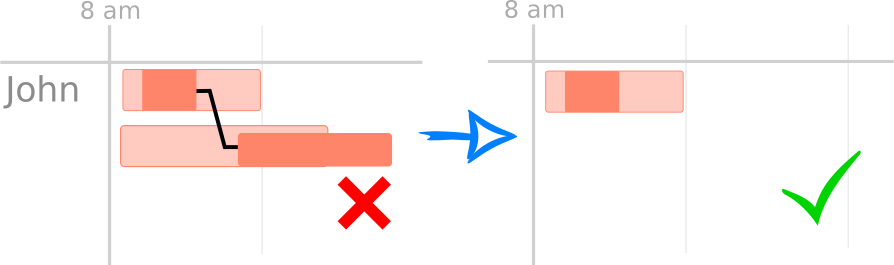
Figure: CapturedNode 5 - Contract canceled rather than violated
Summary
The intrinsic behavior of the optimizer is highly tuned to achieve SLA matching for normal Nodes. Using CapturedNodes guarantees matching SLAs except for the unlikely occasions where exclusive conflicts arise. In these rare cases, skipping a CapturedNode serves as damage control.
Node types and mandatory resource
The Pillar concept appears as dedicated node classes implementing IPillarNode:
| Class | Description |
|---|---|
PillarTimeWindowGeoNode | Geo-located Pillar (latitude/longitude + strict opening hours) |
PillarEventNode | Non-geo Pillar (event-style, strict opening hours, no location) |
A Pillar can optionally be tied to a mandatory resource:
pillar.attachResource(resource);
When attached, the node is not only time-critical but also constrained to one specific resource. This is valuable for:
- Skills or certifications (e.g. dangerous-goods handling)
- Legal requirements
- Named-person commitments (e.g. "this customer expects technician John")
JOpt supports hard constraints beyond Pillar time windows, including mandatory resource assignment and skill/type matching. Every hard constraint in JOpt can also be configured to behave as a soft constraint if desired, giving full control over the boundary between obligation and preference.
Usage example
1) Geo Pillar with mandatory resource
A plumbing job in Cologne with a strict 50-minute time window, assigned to John:
IOpeningHours ohPlumbing =
    new OpeningHours(
        ZonedDateTime.of(2019, JUNE.getValue(), 5, 10, 0, 0, 0,
            ZoneId.of("Europe/Berlin")),
        ZonedDateTime.of(2019, JUNE.getValue(), 5, 10, 50, 0, 0,
            ZoneId.of("Europe/Berlin")));

IPillarNode colognePlumbing =
    new PillarTimeWindowGeoNode(
        "Cologne Plumbing", 50.9333, 6.95, ohPlumbing);

// John must handle this job
colognePlumbing.attachResource(johnRes);

opti.addElement(colognePlumbing);
The optimizer will guarantee that John visits this node between 10:00 and 10:50. If the visit duration equals the opening hour, it is not necessary to provide the duration separately.
2) Event Pillar with mandatory resource
An important phone call for Jack between 10:30 and 12:00, lasting 30 minutes. No location needed:
IOpeningHours ohCall =
    new OpeningHours(
        ZonedDateTime.of(2019, JUNE.getValue(), 6, 10, 30, 0, 0,
            ZoneId.of("Europe/Berlin")),
        ZonedDateTime.of(2019, JUNE.getValue(), 6, 12, 0, 0, 0,
            ZoneId.of("Europe/Berlin")));

Duration visitDuration = Duration.ofMinutes(30);

IPillarNode callJack =
    new PillarEventNode("Important call", ohCall, visitDuration);

// Jack must take this call
callJack.attachResource(jackRes);

opti.addElement(callJack);
The call can be placed anywhere within the 10:30 to 12:00 window, but Jack is guaranteed to be available for 30 minutes within that range.
3) Geo Pillar without mandatory resource
A maintenance job in Stuttgart between 13:30 and 16:00, lasting 90 minutes. Either resource can take it:
IOpeningHours ohMaintenance =
    new OpeningHours(
        ZonedDateTime.of(2019, JUNE.getValue(), 4, 13, 30, 0, 0,
            ZoneId.of("Europe/Berlin")),
        ZonedDateTime.of(2019, JUNE.getValue(), 4, 16, 0, 0, 0,
            ZoneId.of("Europe/Berlin")));

Duration visitDuration = Duration.ofMinutes(90);

IPillarNode maintenanceJob =
    new PillarTimeWindowGeoNode(
        "Maintenance job", 48.7667, 9.18333,
        ohMaintenance, visitDuration);

// No resource attached: optimizer selects the best fit
opti.addElement(maintenanceJob);
The time window is still treated as a hard constraint. The optimizer selects whichever resource can serve this node without violating the SLA.
Modeling guidance
Use Pillars when violations are unacceptable
Use Pillars for truly non-negotiable requirements:
- Contractual appointment windows with penalties for late arrival
- Compliance deadlines imposed by regulation
- Dangerous-goods pickups requiring certified personnel within specific time slots
- Named-person commitments where the wrong technician showing up is as bad as showing up late
Do not use Pillars for preferences
If the time window is preferred but not mandatory, model it as a normal node and handle it through soft constraint penalties, objective weighting, or business rules. Do not use Pillars for, say, a hairdressing appointment where a 10-minute delay is tolerable.
That separation keeps your model honest:
- Architecture for obligations.
- Cost function for preferences and trade-offs.
This clean separation is what makes JOpt's optimization effective. Each layer does what it is designed for. The cost function is not burdened with pseudo-hard constraints that consume optimizer budget.
Impact on optimization space
A CapturedNode limits the available optimization space because the optimizer cannot freely rearrange it. This is by design. However, it means that overusing Pillars (marking every node as a Pillar) will shrink the solution space unnecessarily and reduce optimization quality. Reserve Pillars for the constraints that truly require it.
Closing Words
Pillar Nodes were born from real customer scenarios where penalty-based "hard" constraints failed at scale. The architectural approach to hard constraints is a core differentiator of JOpt.TourOptimizer. If your business has SLA obligations that cannot be modeled as cost trade-offs, Pillars provide the guarantee you need.
For further reading on hard constraints in JOpt, including mandatory resource conditions and skill/type matching, see the Hard Constraints section in Special Features.
Authors
A product by dna-evolutions ©