Performance mode

This feature guide covers performance mode, a property switch in JOpt.TourOptimizer that shortens the runtime of an optimization run by halving the population size and switching off several optimization operators. It is for developers who need fast results on large problems with few constraints. It assumes a working optimization run as in First optimization.
Table of contents
What it does
Performance mode is a faster optimization strategy. It reduces the number of concurrent solutions that genetic evolution evaluates, and it deactivates certain operators throughout the optimization run.
Performance mode suits optimization problems that are not heavily constrained and leave flexibility in scheduling.
Reduced population size
The optimizer cuts the population size in half, so it processes fewer solution candidates at the same time. This allows faster computations, but it may lead to less variation in the solutions and to slower convergence.
Deactivated optimization operators
Performance mode disables these operators:
Single2OptOperatorRecombineOptimizationElementsOperator2RecombineOptimizationElementsOperator3InversionOperatorReciprocalExchangeOperatorRouteSeedOperatorDoubleRouteRandomizeOperatorDisplacementOperator
These operators normally introduce variation into the optimization and help to explore different solutions. Disabling them increases the speed, but it may limit the optimizer's ability to find highly complex solutions.
Faster processing
With a smaller population size and fewer optimization operations, the optimizer requires less computation. This results in up to 50% faster processing.
Example evaluation
To assess the impact of performance mode, we ran a series of optimizations under controlled conditions. The problem setup:
- 2000 nodes and 40 resources;
- skill matching for 1000 of the 2000 nodes;
- 13 of the 40 resources provide the required skill.
The example PerformanceModeBigOptiExample.java builds this setup; its switch addSkillConstraints turns the skill matching on. All runs were executed on an Intel i7-1185G7 processor.
The variable of the tests was the number of iterations in the genetic phase. All other settings, including the problem size and the constraints, stayed the same. The runs measured the total optimization time (including warm-up, construction and simulated annealing) for each combination of performance mode and skill matching.
Execution time by configuration
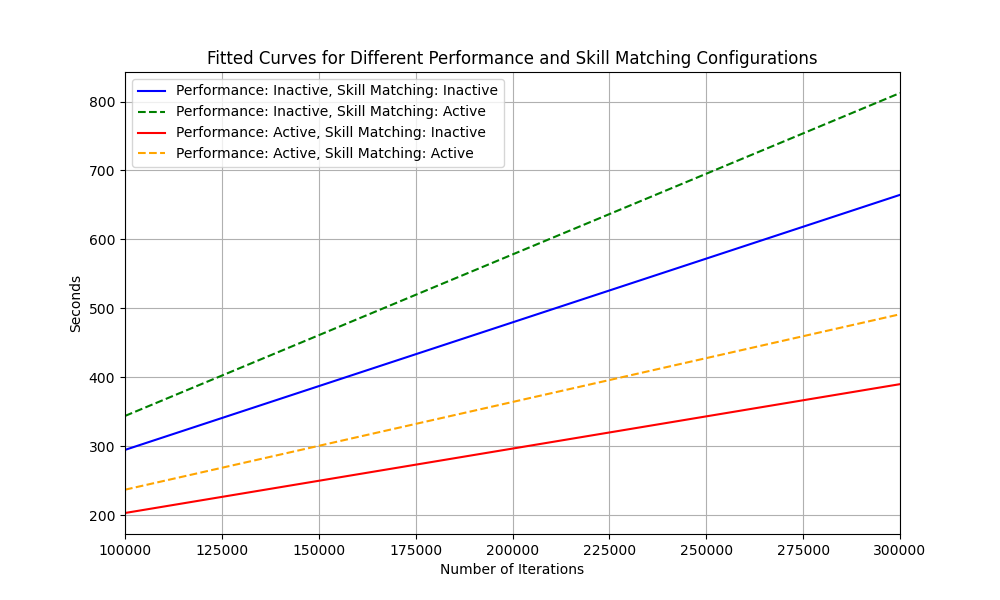
The first graph shows the execution time with performance mode active and inactive, each with skill matching active and inactive. Solid lines are runs without skill matching, dashed lines runs with skill matching. Performance mode reduces the execution time significantly in both cases.
Speed-up by configuration
The second graph shows the speed-up of performance mode, made by dividing the curves of the first graph pairwise. The blue dashed line shows the runs with skill matching, the red solid line the runs without skill matching. The y-axis runs from 1.4 to 1.8.
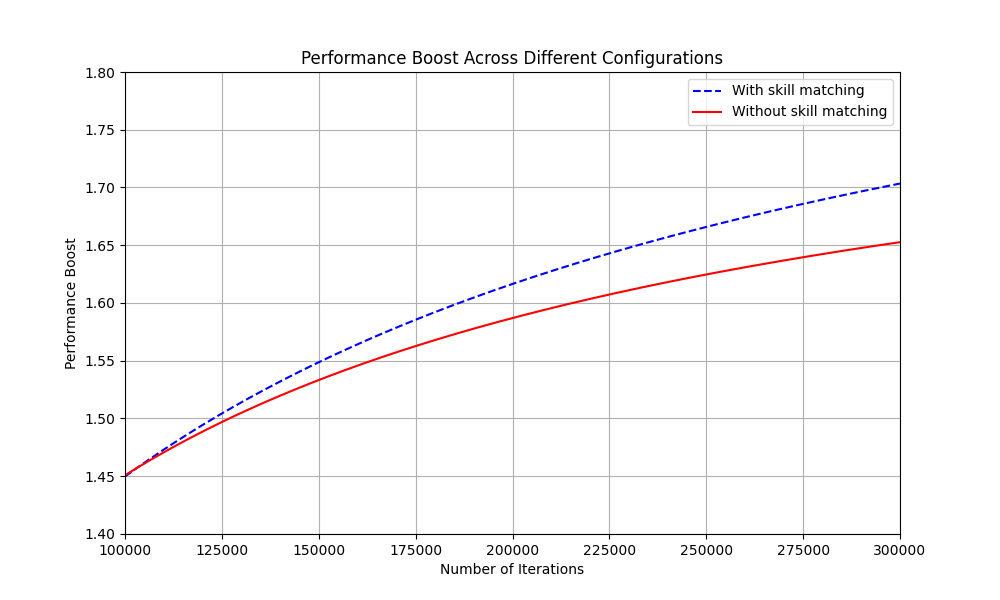
Despite achieving up to 1.7x faster execution, Performance Mode retained approximately 95% of the solution quality when compared to the standard mode, demonstrating its efficiency for large-scale problems with relaxed constraints.
When to use it
Performance mode is not ideal for every optimization. It suits:
- low-restriction problems: few constraints such as time windows, skill requirements or zone codes;
- long opening hours: resources with flexible schedules, which reduce the need for fine-grained optimization;
- large-scale optimizations: many nodes, where a slightly suboptimal solution is acceptable;
- cases where speed matters more than absolute precision.
When not to use it
- Highly constrained problems: if the solution requires strict time windows, skill matching or geographic territories, performance mode might not give the best results.
- Absolute optimality: if the best possible solution matters more than speed, do not use performance mode.
How to use it
Set the property JOpt.PerformanceMode to true:
props.setProperty("JOpt.PerformanceMode", "true");
Switching performance mode with a boolean
The example PerformanceModeExample.java sets the property from a boolean, together with the other properties of the run. The code below is its method addProperties in a shortened form:
private static void addProperties(IOptimization opti, boolean usePerformanceMode) {

    Properties props = new Properties();

    props.setProperty("JOptExitCondition.JOptGenerationCount", "100000"); // High iteration count
    props.setProperty("JOpt.Algorithm.PreOptimization.SA.NumIterations", "100000000"); // High number of iterations
    props.setProperty("JOpt.Algorithm.PreOptimization.SA.NumRepetitions", "1");
    props.setProperty("JOpt.NumCPUCores", "4");

    // Enable Performance Mode
    props.setProperty("JOpt.PerformanceMode", ""+usePerformanceMode);

    opti.addElement(props);
}
With true the run uses performance mode, with false the standard optimization process.
Properties
JOpt.PerformanceMode: switches performance mode on (true) or off (false). Its default is on the Optimization properties page.
Limits
Performance mode reduces the variation in the solution space. In highly constrained scenarios this can lead to slower convergence and to less optimal results.
| Aspect | Standard mode | Performance mode |
|---|---|---|
| Processing speed | Normal | Up to 50% faster |
| Optimization accuracy | High | Reduced |
| Handling complex constraints | Good | Limited |
| Geographical optimization | Precise | Less optimized |
Related examples
- PerformanceModeExample.java on GitHub: an optimization with performance mode switched by a boolean
- PerformanceModeBigOptiExample.java on GitHub: the large setup of the evaluation, with switches for skill constraints and for splitting visits across days
- Performance mode example: the walkthrough of both examples in the hub
Related pages
- Optimization properties:
JOpt.PerformanceModeand the other property keys with their defaults - First optimization: a complete optimization run that sets properties
Authors
DNA Evolutions GmbH
Added: 2026-01-03 (JOpt core 7.5.2-j17) | Last updated: 2026-10-19
Overnight stay
Multi-day routes in JOpt.TourOptimizer with stay nodes, per-day stay control, stay-out policies and recovery rules.
Pickup and delivery
How to model pickup and delivery (PND) problems with JOpt in Java, with node depots, resource depots, the load types, capacity factors and the depot reports.