ZoneCodes and Territory Management
Dynamic territory assignment for resources and nodes
In real-world dispatch operations, resources do not serve everywhere. Technicians cover territories. Drivers serve postal districts. Sales representatives own regions. These territories change: a resource may cover the north side on Monday and the south side on Tuesday. Nodes near territory borders belong to multiple zones, and the optimizer should decide which resource serves them most efficiently.
JOpt.TourOptimizer provides a territory system through ZoneCodes. ZoneCodes function like regional postcodes: they define which resources can visit which nodes, on which days, and under what conditions. Importantly, ZoneCodes are not necessarily geographical. They can be freely defined to represent any grouping: service districts, customer segments, skill categories, contract types, or organizational units. The concept is abstract and adapts to whatever partitioning your business requires. Territories are not static labels. They are dynamic, per-shift, multi-valued, and can be enforced as hard constraints or applied as soft preferences.
Overview
- Core concepts
- ZoneCode types
- Resource side: per-shift territories
- Node side: multi-zone membership
- Hard vs. soft enforcement
- Default behavior and gradual adoption
- Usage example: numbered zones with daily switching
- Usage example: UK postcodes as ZoneCodes
- Modeling guidance
- Interaction with zone crossing penalization
- Closing words
Core concepts
The ZoneCode system has two sides:
Resource side (constraints on WorkingHours). A resource's WorkingHours carry ZoneCode constraints. These constraints define which zones the resource is allowed to serve during that specific shift. Different shifts can carry different zone assignments. This means a resource's territory can change on a daily basis without any model change, just a data update.
Node side (qualifications). Each node carries one or more ZoneCode qualifications that declare which zone(s) the node belongs to. A node can belong to a single zone or to multiple zones simultaneously. When a node has multiple zone qualifications, the optimizer can assign it to any resource whose shift covers at least one of those zones.
The optimizer matches qualifications (node side) against constraints (resource side). If the match succeeds, the resource is allowed to visit the node during that shift. If it fails, the behavior depends on whether the constraint is hard or soft.
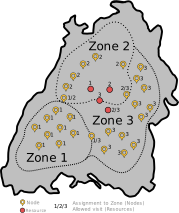
Figure: Typical ZoneCode setup. Resources are assigned to zones via WorkingHours constraints. Nodes carry zone qualifications. Border nodes can belong to multiple zones.
ZoneCode types
JOpt supports two concrete ZoneCode implementations that serve different modeling patterns:
| Type | Class | Typical use |
|---|---|---|
| ZoneNumber | ZoneNumber, ZoneNumberQualification, ZoneNumberConstraint | Numeric territory IDs (district 1, district 2). Suitable for abstract zones, service areas, on-call regions. |
| UKPostCode | UKPostCode, UKPostCodeQualification, UKPostCodeConstraint | UK-style postcode identifiers (B37, B48). Suitable when territories map directly to postal codes or ZIP codes. |
Both types follow the same architecture: constraints on WorkingHours, qualifications on nodes, hard/soft enforcement. The choice depends on your existing territory identifiers. If your dispatch system already uses postal codes, use postcodes. If it uses numeric region IDs, use ZoneNumbers.
Resource side: per-shift territories
ZoneCode constraints are attached to individual WorkingHours, not to the resource as a whole. This is a deliberate design decision that enables daily territory switching.
A resource with two WorkingHours (two shifts or two days) can cover different zones on each:
// Day 1: resource covers Zone 1 and Zone 2
ZoneNumberConstraint constraintDay1 = new ZoneNumberConstraint();
constraintDay1.setIsHard(true);
constraintDay1.addZoneCode(zoneOne);
constraintDay1.addZoneCode(zoneTwo);
woh1.addConstraint(constraintDay1);

// Day 2: resource covers Zone 3 only
ZoneNumberConstraint constraintDay2 = new ZoneNumberConstraint();
constraintDay2.setIsHard(true);
constraintDay2.addZoneCode(zoneThree);
woh2.addConstraint(constraintDay2);
On day 1, the resource can visit nodes in Zone 1 or Zone 2. On day 2, the same resource can only visit nodes in Zone 3. This models rotating coverage, on-call schedules, and territory handovers as a simple data change in the WorkingHours definition.
A single WorkingHours entry can carry multiple ZoneCodes, allowing a resource to cover several zones within one shift. This is useful for resources that operate across adjacent territories or serve as backup coverage for multiple districts.
Node side: multi-zone membership
A node can belong to more than one zone at the same time. This is modeled by adding extra codes to the qualification:
// This node belongs to both Zone 1 and Zone 2
ZoneNumberQualification borderQuali = new ZoneNumberQualification(zoneOne);
borderQuali.addExtraCode(zoneTwo);
borderNode.addQualification(borderQuali);
This is the recommended strategy for handling territory borders. Instead of forcing a binary decision ("this node is in Zone 1, not Zone 2"), you declare that the node sits on the boundary and let the optimizer decide which resource assignment yields the best overall plan.
In practice, this is valuable for:
- Nodes near the border of two service districts
- Customers served by multiple depots
- Locations accessible from different geographic areas (e.g. both sides of a highway)
The optimizer evaluates all eligible resource/shift combinations and selects the one that minimizes total cost while respecting all other constraints.
Hard vs. soft enforcement
Each ZoneCode constraint can be configured as hard or soft:
Hard enforcement
constraint.setIsHard(true);
The resource is not allowed to visit nodes outside its designated zones during this shift. This is an architectural constraint: the optimizer will not generate a solution that violates it. Use this for mandatory territory rules, regulatory boundaries, or contractual service areas.
Soft enforcement
constraint.setIsHard(false);
The resource prefers to stay within its zones but can serve nodes outside them at a penalty cost. The weight of this penalty is controlled by the JOptWeight.ZoneCode property (default: 10.0). Use this for preferred territories where cross-coverage is acceptable but should be minimized.
props.setProperty("JOptWeight.ZoneCode", "10.0");
The hard/soft distinction applies per constraint, per WorkingHours. You can have hard zones on Monday and soft zones on Tuesday for the same resource if the operational rules differ by day.
Default behavior and gradual adoption
If a resource has no ZoneCode constraint on its WorkingHours, it is free to visit all nodes regardless of their zone qualifications. This is an important design property: it allows gradual adoption of the territory system.
You can introduce ZoneCodes incrementally:
- Start by defining zones for nodes only (no effect yet, no constraints on resources).
- Then add constraints to specific resources or specific shifts.
- Keep "floating" resources without constraints for emergency coverage or overflow.
This avoids the all-or-nothing adoption pattern that territory systems in other engines often require.
Usage example: numbered zones with daily switching
In this example, a resource named Jack has two WorkingHours entries (two days). On day 1, he is allowed to visit Zone 1 and Zone 2. On day 2, he switches to Zone 3 only. Nodes are qualified with their respective zones, and one border node ("Oberhausen") carries qualifications for both Zone 1 and Zone 2, allowing either day's assignment.
// Define zones
ZoneNumber zoneOne = new ZoneNumber(1);
ZoneNumber zoneTwo = new ZoneNumber(2);
ZoneNumber zoneThree = new ZoneNumber(3);

// Day 1: Zone 1 + Zone 2
ZoneNumberConstraint constraintWOH1 = new ZoneNumberConstraint();
constraintWOH1.setIsHard(true);
constraintWOH1.addZoneCode(zoneOne);
constraintWOH1.addZoneCode(zoneTwo);
woh1.addConstraint(constraintWOH1);

// Day 2: Zone 3 only
ZoneNumberConstraint constraintWOH2 = new ZoneNumberConstraint();
constraintWOH2.setIsHard(true);
constraintWOH2.addZoneCode(zoneThree);
woh2.addConstraint(constraintWOH2);

// Border node: belongs to Zone 1 and Zone 2
ZoneNumberQualification borderQuali = new ZoneNumberQualification(zoneOne);
borderQuali.addExtraCode(zoneTwo);
oberhausen.addQualification(borderQuali);
The optimizer ensures Jack only visits Zone 1/2 nodes on day 1 and Zone 3 nodes on day 2, while the border node can be served on day 1 by either zone assignment.
Usage example: UK postcodes as ZoneCodes
This example uses UK postcode identifiers as zones. The resource covers postcodes B37 and B48 on day 1, and B36 on day 2. Nodes carry postcode qualifications matching their real postal codes. A node with a non-matching postcode ("KoelnNoMatchingPostCode") cannot be assigned under hard constraints.
This pattern is powerful when territories naturally map to postal codes, ZIP codes, or CRM service regions. No spatial polygons are needed. The ZoneCode system reuses identifiers your dispatch system already maintains.
Modeling guidance
Match granularity to dispatch decisions. If dispatch operates by city districts, use district IDs. If it operates by coarse regions, use coarse zone numbers. Overly granular zones create unnecessary constraints.
Use hard enforcement for regulatory and contractual boundaries. If a technician legally cannot work outside a region, use hard. If it is just preferred, use soft.
Model border nodes with multiple qualifications. This avoids arbitrary assignment near territory edges and lets the optimizer choose the best plan.
Use per-WorkingHours constraints for daily rotation. "Territories change on Monday" becomes a data update in the WorkingHours definition, not a model change.
Keep floating resources for flexibility. Resources without ZoneCode constraints can visit all zones. Use this for emergency coverage, overflow, or senior technicians who cover the entire service area.
Interaction with zone crossing penalization
ZoneCodes serve two separate purposes that work together:
- Territory enforcement (this document): controlling which resources can visit which nodes, per shift.
- Crossing penalization (see Zone Crossing feature guide): adding a cost when a route crosses from one zone to another, discouraging unnecessary boundary transitions.
These two features are complementary. You can enforce territories via hard ZoneCode constraints and still apply crossing penalties for transitions between allowed adjacent zones. For example, a resource is allowed to serve Zone 1 and Zone 2 (territory enforcement), but switching between them during a single route is penalized (crossing penalization). This produces routes that respect territories and minimize bridge/tunnel crossings.
Closing Words
The ZoneCode system in JOpt.TourOptimizer provides territory management that is dynamic (per-shift), multi-valued (nodes in multiple zones), and configurable (hard or soft). To our best knowledge, the combination of per-WorkingHours zone switching with multi-zone node membership is not natively available in other route optimization engines, where territory rules are typically static per resource or require custom constraint implementation.
For zone crossing penalization with asymmetric directional costs, see the Zone Crossing feature guide.
Authors
A product by dna-evolutions ©