Pickup and delivery

This feature guide explains how to model pickup and delivery (PND) problems with JOpt: the goods that resources deliver to nodes or pick up from them, what each resource can carry, and the reports that show every exchange. It also covers production planning, where the optimizer decides how much a node supplies. It is written for developers who use JOpt as a Java library and know the basic elements of an optimization: nodes, resources, opening hours and working hours.
Table of contents
- What it does
- When to use it
- How to use it
- Load exchange between a ResourceDepot and a NodeDepot
- TimedLoad, FlexLoad, and UnloadAllLoad
- Capacity factor
- Analyzing the result of an optimization run
- Properties
- Limits
- Related examples
- Related pages
What it does
In a PND problem, resources deliver goods to nodes and pick up goods from them. JOpt models the goods on both sides. A node holds a NodeDepot with the Load objects that it requests or supplies. A resource holds a ResourceDepot with the LoadCapacity objects that it can carry. The optimizer looks for an exchange of goods between the two parties that is optimal and free of violations, and the result reports each exchange and each capacity violation.
At a glance
Usually, a PND problem consists of a customer Node that requests or supplies goods and a Resource that tries to serve these demands. In this sample, the Node asks to:
- deliver three pallets of fruit (customer request);
- pick up four bags of waste (customer supply).
The Resource either fulfils the demand of the customer or answers the requests in one of two ways:
- Resource is underloaded: only one pallet of fruit is available. Check with the
Nodewhether partial deliveries are possible. - Resource is overloaded: the
Resourcehas no transport capacity left, and the bags of waste cannot be picked up right now.
When to use it
Use the PND module when what is inside the vehicle at any time matters for the plan. The Load types cover cases such as:
- deliveries and pickups on the same route, where the goods on board change from stop to stop;
- a time limit between pickup and delivery, for example for passengers (
TimedLoad); - a flexible amount of goods that the optimizer sets, which allows more efficient solutions, for example the amount a bakery produces (
SupplyFlexLoad); - a load status that can change between supply and request, for example at a warehouse (
MixedFlexLoad); - goods of different sizes that share one cargo space (capacity factors).
How to use it
In Java, you attach a NodeDepot with its loads to each node that exchanges goods, and a ResourceDepot with its load capacities to each resource. NodeDepot, Load, ResourceDepot and LoadCapacity are the primary objects of a PND problem. The two sections below build both sides; the sections after them explain the load exchange, the load types, capacity factors and the reports.
NodeDepot and Load
In JOpt.TourOptimizer, a Node can hold a NodeDepot. The NodeDepot itself can hold any number of Load objects (figure "NodeDepot and loads").
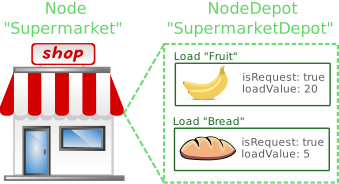
Figure: NodeDepot and loads
A NodeDepot works like a warehouse: a helper object that stores the actual goods, the loads. In its simplest form, it needs only a depotId (for example "SupermarketDepot").
Loads differ in their load ids, the ids of the goods to exchange, and in their exchange state. A Load in its simplest form has four values, and the last three define the exchange state:
- LoadId: the id of the goods that the
Noderequests or supplies (for example "Bread"). - RequestState: whether the
Noderequests goods or supplies them. For the waste pickup above, setisRequest = false. - LoadValue: how many items the node supplies or requests (for example 20).
- Fuzzy: whether a partial delivery or pickup is allowed (for example
isFuzzy = true).
Example: a node with two loads
The following code creates a node (TimeWindowGeoNode), a NodeDepot (SimpleNodeDepot, derived from INodeDepot) and two loads (SimpleLoad, derived from ILoad). It creates the two SimpleLoad objects first, adds them to the NodeDepot, and adds the NodeDepot to the Node:
/*
 * Goal: Creating a NodeDepot with two request-loads
 *        ("Fruit" and "Bread") and attach it to a Node "Supermarket".
 */

// We want "Bread" and "Fruit" to be delivered (we have a request)
boolean isRequest = true;

// We accept partial deliveries of requested goods (fuzzy=true)
boolean isFuzzyAccepted = true;

// We have a fruit request of 20 pallets
ILoad fruitLoad = new SimpleLoad("Fruit", 20, isRequest, isFuzzyAccepted);

// We have a "Bread" request of 5 pallets
ILoad breadLoad = new SimpleLoad("Bread", 5, isRequest, isFuzzyAccepted);

// We create a NodeDepot that can store our different requested loads
INodeDepot supermarketDepot = new SimpleNodeDepot("SupermarketDepot");

// We add the loads to the NodeDepot
supermarketDepot.add(fruitLoad);
supermarketDepot.add(breadLoad);

// We create the Node "Supermarket" and add the NodeDepot
INode supermarket = new TimeWindowGeoNode("Supermarket", 50.9333, 6.95, weeklyOpeningHours, visitDuration, 1);
supermarket.setNodeDepot(supermarketDepot);
The variables weeklyOpeningHours and visitDuration are not defined in this code. The tutorial Basic elements: OpeningHours explains them.
ResourceDepot and LoadCapacity
As a Node can hold a NodeDepot, a Resource can hold a ResourceDepot. The ResourceDepot itself can hold any number of LoadCapacity objects: the potential capacity of the goods that the resource can transport. A LoadCapacity is the counterpart of a Load (figure "ResourceDepot and load capacities").
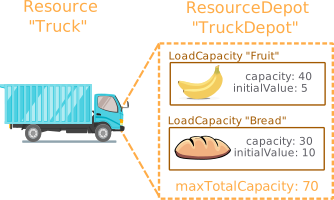
Figure: ResourceDepot and load capacities
A ResourceDepot, as part of the truck, is a helper object that stores load capacities. In its simplest form, a ResourceDepot needs two values:
- ResourceDepotId: the id of the depot (for example "TruckDepot").
- Total maximal capacity: the total value of all goods of all attached load capacities that the resource can pick up (for example 70).
Load capacities differ mainly in their load capacity ids, the ids of the goods they can transport, and in their capacity values. A LoadCapacity has three values:
- LoadCapacityId: the id of the goods the resource can transport (for example "Bread").
- Individual maximal capacity: if the truck loads only this type of goods, how much fits before it is overloaded (for example 70). If no further limitation exists, the individual maximal capacity of a
LoadCapacityis the same as the maximal capacity of theResourceDepotit belongs to. - Initial load value: how many items are on board before the trip starts (for example 5).
Example: a resource with two load capacities
The following code creates a resource (CapacityResource), a ResourceDepot (SimpleResourceDepot, derived from IResourceDepot) and two load capacities (SimpleLoadCapacity, derived from ILoadCapacity). It creates the two SimpleLoadCapacity objects first, adds them to the SimpleResourceDepot, and adds the SimpleResourceDepot to the Resource:
/*
 * Creating a ResourceDepot with two LoadCapacities and attach it to a Resource
 */

// Define the LoadCapacities "Fruit" and "Bread"

// We can carry a maximum of 40 pallets of fruit (Assuming we have
// no "Bread" on our truck). We start with an initial load of 5 pallets of fruit.
// We can carry a maximum of 40 pallets of fruit. We start with an initial load of 5 pallets of fruit and 10
// initial load pallets of "Bread" of the maximum 30.
ILoadCapacity fruitLoadCapacity= new SimpleLoadCapacity("Fruit", 70, 5);

ILoadCapacity breadLoadCapacity = new SimpleLoadCapacity("Bread", 70, 10);

// We create a ResourceDepot that can store our different LoadCapacities
// The depot can handle a total of 70 pallets
IResourceDepot depot = new SimpleResourceDepot("truckDepot", 70);

// We add the capacityLoads to the depot
depot.add(fruitLoadCapacity);
depot.add(breadLoadCapacity);

// We create a Resource "Truck" and  add the depot to our Resource
IResource truck = new CapacityResource("Truck", 50.1167, 7.68333, maxWorkingTime, maxDistanceKmW, workingHours);
truck.setResourceDepot(depot);
PND in the JSON input of the REST service
The REST service of JOpt.TourOptimizer takes the depots in JSON. A node carries its NodeDepot in the field nodeDepot, and a resource carries its ResourceDepot in the field resourceDepot. In the result, each route element holds the node depot before and after the visit in beforeVisitNodeDepot and afterVisitNodeDepot. The API reference lists the fields and the load types that the REST service accepts.
Load exchange between a ResourceDepot and a NodeDepot
This section shows how the optimizer performs the load exchange between a ResourceDepot and a NodeDepot, and which violations can occur during a load exchange.
How the load exchange works
The loads of a NodeDepot and the load capacities of a ResourceDepot are the counterparts in a load exchange.
A NodeDepot holds the requests and supplies of goods (its loads) of a customer. The ResourceDepot holds the potential and the actual amount of goods on the transport vehicle (its load capacities). Each Load of a NodeDepot needs a matching LoadCapacity of a ResourceDepot for a successful exchange: the load capacity id and the load id must be the same (for example a Load with the load id "Fruit" and a LoadCapacity with the load capacity id "Fruit").
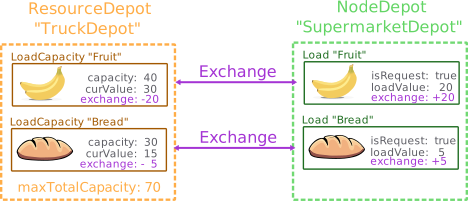
Figure: Load exchange
The figure "Load exchange" shows an exchange of two goods, "Fruit" and "Bread", without violations. Before the visit, the fruit load capacity has a load value of 30, and it supplies the NodeDepot with the requested 20 items of "Fruit". After the visit, 10 "Fruit" are left on the truck, and the fruit load capacity has a new load value of 10.
In a PND problem, a Resource usually visits several customer nodes on the same Route. During the optimization, the optimizer evaluates many solutions with different visit orders.
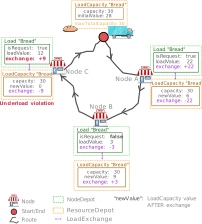
Figure: Multi visit
The figure "Multi visit" shows a typical solution for a single route of a PND problem. The Resource starts with an initial load value of 28 "Bread" and a maximal capacity of 30.
- The first customer node, A, requests 22 "Bread". After the visit, the truck has 6 "Bread" left.
- The next node, B, supplies 3 "Bread" to the
Resource, which raises its load value to 9. - The last customer node, C, requests 12 "Bread". With only 9 "Bread" left, the truck is underloaded and cannot fulfil the request completely. The customer in this sample also accepts a fuzzy delivery, so the truck delivers the 9 "Bread" that are available.
Types of capacity violations
JOpt.TourOptimizer distinguishes several violation types. The figure "Multi visit" already shows an underload violation. An underload violation can occur in two ways, which the figure "Underload violations" summarizes.
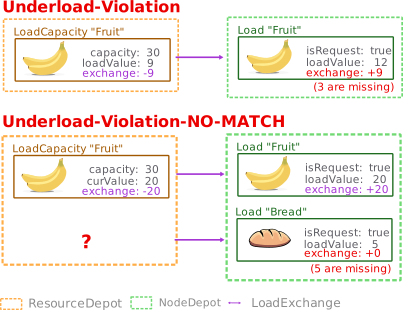
Figure: Underload violations
- Underload: the
ResourceDepothas not enough goods left in theLoadCapacityto serve the customer request. - Underload-NO-MATCH: the
Resourcehas noResourceDepotwith aLoadCapacitywhose load capacity id matches the load id that the customerNoderequests.
The other type is the overload violation. When a Node wants to supply too many goods, a ResourceDepot can reject them. An overload violation occurs because of total overloading or because of individual overloading, as the figure "Overload violations" summarizes.
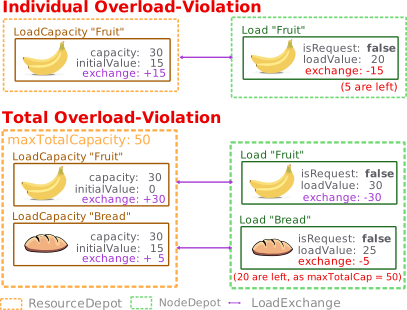
Figure: Overload violations
- Individual overloading: each
LoadCapacityin aResourceDepothas an individual maximal capacity: the maximal amount of this type of goods that fits on the truck. If anyLoadCapacitycan use all the space, its individual maximal capacity is the same as the total maximal capacity of theResourceDepot. JOpt.TourOptimizer also solves more specific problems. In this sample, a truck has a cold storage room for a specialLoadCapacitytype "FrozenMeat". The freezer takes up half the floor space of the truck, so the individual maximal capacity of thisLoadCapacityis only half the total maximal capacity of theResourceDepot. When the freezer is full, no more "FrozenMeat" fits, even though the other half of the floor space (not cooled) is still empty. - Total overloading: a
ResourceDepothas a maximal total capacity, which includes all goods that theResourceDepotmay store. Take theResourceDepotof the figure "Overload violations", which is asked to pick up 30 "Fruit" and 25 "Bread" from a singleNodeDepot. The total capacity of theResourceDepotis 50. The initial load value of "Fruit" is zero, and the initial load value of "Bread" is 15. "Fruit" is the firstLoadthat is transferred. Because the initial load value of the fruitLoadCapacityis zero, all 30 pallets of "Fruit" are transferred. After this first exchange, theResourceDepotholds 30 "Fruit" + 15 "Bread" = 45 items. With a total capacity of 50, theResourceDepotaccepts only 5 more "Bread" (instead of 25) to avoid total overloading.
ResourceDepot never supplies more goods than its load capacities contain: if a request exceeds the goods in the ResourceDepot, the requesting NodeDepot gets fewer goods than requested. A ResourceDepot also never takes more goods than its maximal capacity, set by its total and individual LoadCapacity limits: the supplying NodeDepot keeps the loads that the ResourceDepot rejects.TimedLoad, FlexLoad, and UnloadAllLoad
So far, this guide uses only SimpleLoad. Timed, flexible and unload-all loads are special kinds of Load. A TimedLoad sets a duration within which the goods need to be picked up and delivered. If the maximal duration is violated, the solution gets a penalty cost through a soft constraint. A flexible load can create an additional supply or request, depending on what the solution of the PND problem needs. An UnloadAllLoad can request all goods of a ResourceDepot.
The next sections give an overview of the load types and then sample use cases.
Overview of the load types
The figure "Types of load" shows the types of loads and their relations. The main types are:
- SimpleLoad: a user-defined load value and a user-defined load status (request or supply).
- TimedLoad: a fixed load value of one, which cannot be changed, and a user-defined load status (request or supply). A user-defined duration sets how long a load may stay in a ResourceDepot after the
TimedLoadis picked up. In practice, this is the time the goods spend on the road in the truck. If the maximal duration is violated, the result reports a CAPACITY/OVERTIME violation, the label of a TimedLoad that stays on board too long, and the solution gets a penalty cost. - MixedFlexLoad: the load value (zero at first, or user-defined) can change as a result of the optimization. The load status (request or supply) can change as a result of the optimization as well.
- UnloadAllLoad: Load value will adjust itself to request one or several LoadCapacities of a ResourceDepot completely.

Figure: Types of load
Besides the main types, the figure shows these sub-types:
- RequestFlexLoad: like a
MixedFlexLoad, where the optimizer sets the load value and the load status is request. - SupplyFlexLoad: like a
MixedFlexLoad, where the optimizer sets the load value and the load status is supply. - TimedSupplyFlexLoad: a hybrid of
TimedLoadandSupplyFlexLoad, with a load value of zero or one and the fixed load status supply. The optimizer can change the load value to either zero or one. A user-defined duration describes how long aLoadCapacityis allowed to stay in aResourceDepotafter theLoadgot picked up from aNodeDepot.
Use cases for load types
The following samples show how each load type can be used. The PND examples on GitHub hold the code.
TimedLoad example
A cab company transports three people (Max, Peter and Lars). The cab driver picks up each of them at one place and drops them at another. The cab can carry at most three passengers at the same time. Max, Peter and Lars have different pickup places and destinations, and the cab company promised each of them that the trip takes no more than one hour.
Task for the optimizer: pick up each passenger and deliver them to their destination within one hour.
MixedFlexLoad example
A Resource delivers and picks up "Fridges" and "TVs". Each customer Node decides what the Resource picks up or delivers. Planning the initial load of a truck can be hard in mixed pickup and delivery problems, so this sample uses a MixedFlexLoad that can change its request or supply status during the optimization. Here a MixedFlexLoad works like a warehouse where the Resource can reload or unload goods to avoid overloading and underloading. Like all other loads, a MixedFlexLoad belongs to an INodeDepot. For a better overview, the example puts the MixedFlexLoad in a separate NodeDepot on a node that exists only to hold it (the node "FlexNode").
Task for the optimizer: find the optimal load value and load status for "Fridges" and "TVs" to avoid overloading and underloading the ResourceDepot. The MixedFlexLoad of the separate node serves as a buffer.
MixedFlexLoad (or the related SupplyFlexLoad and RequestFlexLoad), we suggest a dedicated Node that acts only as a warehouse node. You can attach flexible loads to any NodeDepot of any Node, but dedicated nodes with NodeDepot objects that carry the flexible loads keep the model easier to understand.RequestFlexLoad example
This sample builds on the MixedFlexLoad example. Instead of a full warehouse, there is only temporary storage, for example at the home of the Resource. The Resource gets 6 "Fridges" in the morning, but realizes it only needs 2 for the Route. It will leave 4 at the MixedFlexLoad and therefore has more room for other supply or pick up tasks.
Task for the optimizer: find the optimal load value for "Fridges" and "TVs" to avoid overloading the ResourceDepot.
SupplyFlexLoad example
Two resources, "JackTruckCologne" and "JohnTruckAachen", work for a bakery chain and deliver "Bread" to supermarkets. Each supermarket sets its request. Each resource belongs to a bakery at a different location. Two SupplyFlexLoad objects are added to the node depots of the bakeries, and each of them supplies a number of trays of bread that the optimizer sets. The optimized amount of each SupplyFlexLoad is the number of pallets of bread that the bakery has to prepare: the optimizer has done the production planning.
The section Special features: pickup and delivery and manufacturing planning gives an overview of manufacturing planning problems.
Task for the optimizer: find the optimal load value for each SupplyFlexLoad to avoid underloading and to serve all supermarkets with "Bread".
TimedSupplyFlexLoad example
Two pizza restaurants of the same chain, one in Cologne and one in Essen, have one delivery driver each. For every customer order, the chain decides which restaurant serves it.
The chain advertises: "If you don't get your pizza within 90 minutes, you get it for free!" So each pizza must be delivered within 90 minutes. Two TimedSupplyFlexLoads describe two orders that can contain several user-defined types of pizza (e.g., "Pizza Margherita" for customer Tom, or "Pizza Mexican" for customer Sophia).
The optimizer does the manufacturing planning: the optimized load value (zero or one) of each TimedSupplyFlexLoad says which pizzas each restaurant prepares so that they arrive within 90 minutes.
Task for the optimizer: deliver each pizza within 90 minutes. The final optimized load values of the TimedSupplyFlexLoad objects decide automatically which restaurant prepares which pizza.
UnloadAllLoad example
A Resource picks up "Waste" from customers (customer supply). After a few customers, the ResourceDepot is full. To avoid overloading, the resource can visit UnloadAllLoad nodes, where it unloads all "Waste" (request). Each UnloadAllLoad acts as a landfill and belongs to a separate NodeDepot of a separate optional node.
UnloadAllLoad with a MixedFlexLoad or a RequestFlexLoad. When it is clear that the Resource unloads everything, use an UnloadAllLoad: it saves the optimizer unnecessary computational work.Task for the optimizer: place the waste dumps along the Route and find the dumps that the resource must visit to avoid overloading.
Capacity factor
So far, this guide assumes that every Load has the same size and weight as any other Load. In practice, some loads need more space than others, and some can be stacked while others cannot.
Take the following sample: a Resource called JackTruck delivers and picks up "Pianos" and "Cups". Each customer decides what is picked up (customer supply) and what is delivered (customer request).
A truck can load more units of "Cups" than units of "Pianos". The "Cups" travel on pallets of 1219 x 1016 mm. The pallets must not be stacked, because the "Cups" could break. Each customer Node requests or provides whole pallets of cups, not single cups. A piano has a floor space of 160 x 140 cm and cannot be stacked either (figure "Dimensions of loads").
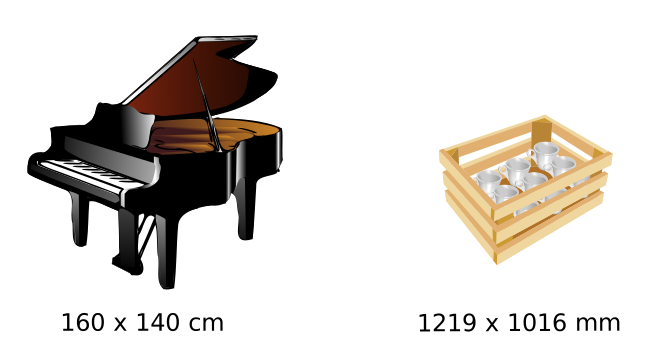
Figure: Dimensions of loads
The truck has a floor space of 7 x 2.5 m. The goal is to tell the optimizer the maximal amount of both goods that the truck can carry without overloading. For this, you calculate the equivalent of one piano and of one pallet of cups in a ground unit, here the square meter.
CargoSpace for these calculations (PNDCapacityFactorExample on GitHub).Maximal individual load
The maximal individual load is the maximal amount of goods of one type when no other goods are on board. The following code calculates it:
// Define the cargo space of the truck
ICargoSpace truckCargoSpace =
  new CargoSpace(
    Quantities.getQuantity(7.0, METRE), Quantities.getQuantity(2.5, METRE));

// Define the cargo goods for the piano
ICargoSpaceGood pianoCargoGood =
  new CargoSpaceGood(
    Quantities.getQuantity(160, CENTI(METRE)), Quantities.getQuantity(140, CENTI(METRE)));

// Define the cargo good for the cups
ICargoSpaceGood cupsCargoGood =
   new CargoSpaceGood(
    Quantities.getQuantity(1219, MILLI(METRE)), Quantities.getQuantity(1016, MILLI(METRE)));

// What would be the maximal individual  Load of a certain good in our truckCargoSpace?
double maxPianoLoad = pianoCargoGood.calculateMaxIndividualLoading(truckCargoSpace);
double maxCupLoad = cupsCargoGood.calculateMaxIndividualLoading(truckCargoSpace);

// Result: maxPianoLoad = 4 and maxCupLoad = 10

// Now we can define the individual load Capacities for Piano and Cup
// Note: The initial load is NOT an abstract unit. Here it is the number of Pianos and number of
// pallets that are already on the truck.
ILoadCapacity pianoCapacity = new SimpleLoadCapacity("Piano", maxPianoLoad, 2);
ILoadCapacity cupCapacity = new SimpleLoadCapacity("Cup", maxCupLoad, 5);
The result is a maximal individual load of 4 for pianos and 10 for pallets of cups: the truck can load either 4 pianos or 10 pallets of cups. To find out whether 2 "Pianos" and 6 pallets of "Cups" overload the truck, you relate "Pianos" and pallets of "Cups" to the ground unit of the ResourceDepot. The capacity factors for "Piano" and for pallets of "Cups" establish this relation.
Calculating the capacity factors
The following code calculates the capacity factors in the ground unit of the ResourceDepot:
// Calculate the max loading in the ground unit - For space, this is in square meter
double maxTotalLoadValue = truckCargoSpace.calculateMaxTotalLoadingCapacity();

// Result: maxTotalLoadValue = 17.5

// Define a depot for our truck that has a capacity (defined in the ground unit)
IResourceDepot depot =
   new SimpleResourceDepot("JackTruckDepot", maxTotalLoadValue);

// Calculate the individual loading factors:
// =========================================
// The loadFactor calculation can fail, in case the maximal individual load
// would be zero. Therefore an Optional is returned.

Optional<Double> pianoLoadFactorOpt =
   truckCargoSpace.calculateLoadingCapacityFactor(pianoCargoGood);

Optional<Double> cupsLoadFactorOpt =
       truckCargoSpace.calculateLoadingCapacityFactor(cupsCargoGood);

// Result: pianoLoadFactor = 4.375 and maxCupLoad = 1.75

// Add the factors, if existing
if (pianoLoadFactorOpt.isPresent()) {
    Double pianoLoadFactor = pianoLoadFactorOpt.get();
    depot.add("Piano", pianoLoadFactor);
}

if (cupsLoadFactorOpt.isPresent()) {
    Double cupsLoadFactor = cupsLoadFactorOpt.get();
    depot.add("Cup", cupsLoadFactor);

}

// Add the loadCapacities
depot.add(pianoCpacity);
depot.add(cupCpacity);
The maximal total load capacity of the truck is 17.5: its floor space in square meters. The capacity factors are 1.75 for a pallet of cups and 4.375 for a piano. These values are also the floor space that one unit of each good takes up.
After this setup, you can run the optimization.
Analyzing the result of an optimization run
After a PND problem is solved, the optimizer gives its default result output. This section explains how the optimizer reports the PND part.
Running PNDBakeryChainFlexLoadExample gives a result like the following sample output; the dates and values are examples:
Show or hide the sample result
-------------------------------- --------------------------
--------------------- RESULTS -----------------------------
----------------- -----------------------------------------
 Number of Route         : 2
 Number of Route (sched.): 2
 Total Route Elements    : 10
 Total cost              : 627.4498933084467
-----------------------------------------------------------
 Total time        [h]   : 17
 Total idle time   [h]   : 0
 Total prod. time  [h]   : 10
 Total tran. time  [h]   : 6
 Total utilization [%]   : 61
 Total distance    [km]  : 540
 Termi. time       [h]   : 3
 Termi. distance   [km]  : 256

----------------------- -----------------------------------
--------------------- ROUTES ------------------------------
---------------------- ------------------------------------

-----------------------------------------------------------
Route information
Route Status           : Optimizable
RouteId                : 0
Resource               : JackTruckCologne
Alternate destination  : false
Closed route           : true
Defined WorkingHours   : 11.03.2020 08:00:00 - 11.03.2020 20:00:00 (Europe/Berlin)
Effective Route Start  : 11.03.2020 08:00:00 (Europe/Berlin)
Effective Route Stop   : 11.03.2020 17:40:52 (Europe/Berlin)
Max Idle Reduc.  [min] : 0.0
Max Early Redu.  [min] : 0.0
Max Early P-Redc.[min] : 0.0
Reduc. time usage[min] : 0
Max Post Reduc.  [min] : 0.0
Post time usage  [min] : 0
WorkingHours Index     : 0
-----------------------------------------------------------
Route cost             : 392.7634772786474
Route time       [min] : 580
Transit time     [min] : 260
Productive. time [min] : 320
Idle time        [min] : 0
White Idle time  [min] : 0
Ind. Idle time   [min] : 0
Route Distance   [km]  : 344.357
Termi. time      [min] : 122
Termi. distance  [km]  : 162.097
Utilization      [%]   : 53
Start Id               : JackTruckCologne
Termination Id         : JackTruckCologne

------- ResourceDepot Report (JackTruckCologne)-------
START:
---
Id: JackTruckCologneDepot / Type: SimpleResourceDepot  / MaxTotalCapacity: 20.0 / UsedCapacity: 0.0
(0) LoadCapacity:
Id: Bread / Type: SimpleLoadCapacity / Load: 0.0 / maxCapacity: 20.0 /

TERMINATION:
---
Id: JackTruckCologneDepot / Type: SimpleResourceDepot  / MaxTotalCapacity: 20.0 / UsedCapacity: 0.0
(0) LoadCapacity:
Id: Bread / Type: SimpleLoadCapacity / Load: 0.0 / maxCapacity: 20.0 /
------- ResourceDepot Report END -------

0.0 SupplyFlexNodeCologne / Arrival: 11.03.2020 08:00:00 (Europe/Berlin) , Departure: 11.03.2020 09:20:00 (Europe/Berlin) / Duration: 80 [min] / Driving: 0.0 [min], 0.0 [km]
Depot before visit: Id: SupplyFlexNodeCologneDepot / Type: SimpleNodeDepot / Loads: [ Id: Bread / Type: SupplyFlexLoad / Desired Load Exchange: 14.0 / IsRequest: false / IsFuzzy: false / Priority: 1]
Depot after visit : Id: SupplyFlexNodeCologneDepot / Type: SimpleNodeDepot / Loads: [ Id: Bread / Type: SupplyFlexLoad / Desired Load Exchange: 0.0 / IsRequest: false / IsFuzzy: false / Priority: 1]

0.1 StoreEssen / Arrival: 11.03.2020 10:03:38 (Europe/Berlin) , Departure: 11.03.2020 11:23:38 (Europe/Berlin) / Duration: 80 [min] / Driving: 43.64 [min], 57.605 [km]
Depot before visit: Id: StoreEssenDepot / Type: SimpleNodeDepot / Loads: [ Id: Bread / Type: SimpleLoad / Desired Load Exchange: 5.0 / IsRequest: true / IsFuzzy: true / Priority: 1]
Depot after visit : Id: StoreEssenDepot / Type: SimpleNodeDepot / Loads: [ Id: Bread / Type: SimpleLoad / Desired Load Exchange: 0.0 / IsRequest: true / IsFuzzy: true / Priority: 1]

0.2 StoreDortmund / Arrival: 11.03.2020 11:48:49 (Europe/Berlin) , Departure: 11.03.2020 13:08:49 (Europe/Berlin) / Duration: 80 [min] / Driving: 25.19 [min], 33.245 [km]
Depot before visit: Id: StoreDortmundDepot / Type: SimpleNodeDepot / Loads: [ Id: Bread / Type: SimpleLoad / Desired Load Exchange: 8.0 / IsRequest: true / IsFuzzy: true / Priority: 1]
Depot after visit : Id: StoreDortmundDepot / Type: SimpleNodeDepot / Loads: [ Id: Bread / Type: SimpleLoad / Desired Load Exchange: 0.0 / IsRequest: true / IsFuzzy: true / Priority: 1]

0.3 StoreBielefeld / Arrival: 11.03.2020 14:18:04 (Europe/Berlin) , Departure: 11.03.2020 15:38:04 (Europe/Berlin) / Duration: 80 [min] / Driving: 69.25 [min], 91.408 [km]
Depot before visit: Id: StoreBielefeldDepot / Type: SimpleNodeDepot / Loads: [ Id: Bread / Type: SimpleLoad / Desired Load Exchange: 1.0 / IsRequest: true / IsFuzzy: true / Priority: 1]
Depot after visit : Id: StoreBielefeldDepot / Type: SimpleNodeDepot / Loads: [ Id: Bread / Type: SimpleLoad / Desired Load Exchange: 0.0 / IsRequest: true / IsFuzzy: true / Priority: 1]


ViolationSumary:
Cost TotalSum: 48.40637916666667,Cost RouteTime: 48.40637916666667
-----------------------------------------------------------
Route information
Route Status           : Optimizable
RouteId                : 1
Resource               : JohnTruckAachen
Alternate destination  : false
Closed route           : true
Defined WorkingHours   : 11.03.2020 08:00:00 - 11.03.2020 20:00:00 (Europe/Berlin)
Effective Route Start  : 11.03.2020 08:00:00 (Europe/Berlin)
Effective Route Stop   : 11.03.2020 15:48:13 (Europe/Berlin)
Max Idle Reduc.  [min] : 0.0
Max Early Redu.  [min] : 0.0
Max Early P-Redc.[min] : 0.0
Reduc. time usage[min] : 0
Max Post Reduc.  [min] : 0.0
Post time usage  [min] : 0
WorkingHours Index     : 0
-----------------------------------------------------------
Route cost             : 234.68641602979932
Route time       [min] : 468
Transit time     [min] : 148
Productive. time [min] : 320
Idle time        [min] : 0
White Idle time  [min] : 0
Ind. Idle time   [min] : 0
Route Distance   [km]  : 195.667
Termi. time      [min] : 71
Termi. distance  [km]  : 93.938
Utilization      [%]   : 53
Start Id               : JohnTruckAachen
Termination Id         : JohnTruckAachen

------- ResourceDepot Report (JohnTruckAachen)-------
START:
---
Id: JohnTruckAachenDepot / Type: SimpleResourceDepot  / MaxTotalCapacity: 20.0 / UsedCapacity: 0.0
(0) LoadCapacity:
Id: Bread / Type: SimpleLoadCapacity / Load: 0.0 / maxCapacity: 20.0 /

TERMINATION:
---
Id: JohnTruckAachenDepot / Type: SimpleResourceDepot  / MaxTotalCapacity: 20.0 / UsedCapacity: 0.0
(0) LoadCapacity:
Id: Bread / Type: SimpleLoadCapacity / Load: 0.0 / maxCapacity: 20.0 /
------- ResourceDepot Report END -------

1.0 SupplyFlexNodeAachen / Arrival: 11.03.2020 08:00:07 (Europe/Berlin) , Departure: 11.03.2020 09:20:07 (Europe/Berlin) / Duration: 80 [min] / Driving: 0.12 [min], 0.156 [km]
Depot before visit: Id: SupplyFlexNodeAachenDepot / Type: SimpleNodeDepot / Loads: [ Id: Bread / Type: SupplyFlexLoad / Desired Load Exchange: 13.0 / IsRequest: false / IsFuzzy: false / Priority: 1]
Depot after visit : Id: SupplyFlexNodeAachenDepot / Type: SimpleNodeDepot / Loads: [ Id: Bread / Type: SupplyFlexLoad / Desired Load Exchange: 0.0 / IsRequest: false / IsFuzzy: false / Priority: 1]

1.1 StoreDueren / Arrival: 11.03.2020 09:41:35 (Europe/Berlin) , Departure: 11.03.2020 11:01:35 (Europe/Berlin) / Duration: 80 [min] / Driving: 21.47 [min], 28.344 [km]
Depot before visit: Id: StoreDuerenDepot / Type: SimpleNodeDepot / Loads: [ Id: Bread / Type: SimpleLoad / Desired Load Exchange: 2.0 / IsRequest: true / IsFuzzy: true / Priority: 1]
Depot after visit : Id: StoreDuerenDepot / Type: SimpleNodeDepot / Loads: [ Id: Bread / Type: SimpleLoad / Desired Load Exchange: 0.0 / IsRequest: true / IsFuzzy: true / Priority: 1]

1.2 StoreLeverkusen / Arrival: 11.03.2020 11:35:45 (Europe/Berlin) , Departure: 11.03.2020 12:55:45 (Europe/Berlin) / Duration: 80 [min] / Driving: 34.17 [min], 45.102 [km]
Depot before visit: Id: StoreLeverkusenDepot / Type: SimpleNodeDepot / Loads: [ Id: Bread / Type: SimpleLoad / Desired Load Exchange: 7.0 / IsRequest: true / IsFuzzy: true / Priority: 1]
Depot after visit : Id: StoreLeverkusenDepot / Type: SimpleNodeDepot / Loads: [ Id: Bread / Type: SimpleLoad / Desired Load Exchange: 0.0 / IsRequest: true / IsFuzzy: true / Priority: 1]

1.3 StoreWuppertal / Arrival: 11.03.2020 13:17:04 (Europe/Berlin) , Departure: 11.03.2020 14:37:04 (Europe/Berlin) / Duration: 80 [min] / Driving: 21.31 [min], 28.125 [km]
Depot before visit: Id: StoreWuppertalDepot / Type: SimpleNodeDepot / Loads: [ Id: Bread / Type: SimpleLoad / Desired Load Exchange: 4.0 / IsRequest: true / IsFuzzy: true / Priority: 1]
Depot after visit : Id: StoreWuppertalDepot / Type: SimpleNodeDepot / Loads: [ Id: Bread / Type: SimpleLoad / Desired Load Exchange: 0.0 / IsRequest: true / IsFuzzy: true / Priority: 1]


ViolationSumary:
Cost TotalSum: 39.01938055555556,Cost RouteTime: 39.01938055555556
The PND parts of the result are two reports:
- ResourceDepot report: the initial load that the resource starts with and the final load after the resource finishes the
Route(one report perRoute). - NodeDepot report: the desired exchange before and after the visit (one report per
NodeperRoute).
ResourceDepot report
The ResourceDepot report of a resource has two parts:
- START: the properties of the
ResourceDepotbefore theRoutestarts. - TERMINATION: the properties of the
ResourceDepotafter theRouteends.
------- ResourceDepot Report (ID_OF_THE_RESOURCE)-------
START:
---
...

TERMINATION:
---
...
------- ResourceDepot Report END -------
The figure "ResourceDepot start and termination" shows the two states of the ResourceDepot, at the start and at the termination.
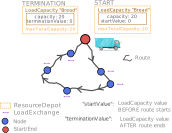
Figure: ResourceDepot start and termination
The start and termination parts show the ResourceDepot and its load capacities. Here the report is formatted for readability:
   Id:               JackTruckCologneDepot /
   Type:             SimpleResourceDepot  /
   MaxTotalCapacity: 20.0 /
   UsedCapacity:     0.0

   (0) LoadCapacity:
       Id:            Bread /
       Type:          SimpleLoadCapacity /
       Load:          0.0 /
       maxCapacity:   20.0 /
The fields:
- Properties of the ResourceDepot:
- Id: the id of the
ResourceDepot(for example "JackTruckCologneDepot"). - Type: the type of the
ResourceDepot(for example "SimpleResourceDepot"). - MaxTotalCapacity: the maximal total capacity (for example "20").
- UsedCapacity: the total capacity in use, including all loads (for example "0" if nothing is loaded).
- Id: the id of the
- Properties of the load capacities:
- (n) LoadCapacity: the index n of the
LoadCapacityin theResourceDepot(for example "(0)"). - Id: the id of the
LoadCapacity(for example "Bread"). - Type: the type of the
LoadCapacity(for example "SimpleLoadCapacity"). - Load: the current load value of the
LoadCapacity(for example "0"). - maxCapacity: the individual maximal capacity of the
LoadCapacity(for example "20").
- (n) LoadCapacity: the index n of the
The full report, unformatted:
------- ResourceDepot Report (JohnTruckAachen)-------
START:
---
Id: JohnTruckAachenDepot / Type: SimpleResourceDepot  / MaxTotalCapacity: 20.0 / UsedCapacity: 0.0

(0) LoadCapacity:
 Id: Bread / Type: SimpleLoadCapacity / Load: 0.0 / maxCapacity: 20.0 /

TERMINATION:
---
Id: JohnTruckAachenDepot / Type: SimpleResourceDepot  / MaxTotalCapacity: 20.0 / UsedCapacity: 0.0

(0) LoadCapacity:
 Id: Bread / Type: SimpleLoadCapacity / Load: 0.0 / maxCapacity: 20.0 /
------- ResourceDepot Report END -------
The report reads as follows. A Resource with the id "JohnTruckAachen" has a ResourceDepot with the id "JohnTruckAachenDepot", which may carry a LoadCapacity with the id "Bread". The maximal total capacity of the ResourceDepot is 20, and the individual maximal capacity is also 20.
Before the start, the truck is empty: the load value of Bread is zero. After the Route, the load value is also zero, so no "Bread" is left on the truck.
NodeDepot report
The output for a single node, StoreLeverkusen, from the sample result above:
1.2 StoreLeverkusen / Arrival: 11.03.2020 11:35:45 (Europe/Berlin) , Departure: 11.03.2020 12:55:45 (Europe/Berlin) / Duration: 80 [min] / Driving: 34.17 [min], 45.102 [km]

 Depot before visit: Id: StoreLeverkusenDepot / Type: SimpleNodeDepot / Loads:
 [ Id: Bread / Type: SimpleLoad / Desired Load Exchange: 7.0 / IsRequest: true / IsFuzzy: true / Priority: 1]

 Depot after visit : Id: StoreLeverkusenDepot / Type: SimpleNodeDepot / Loads:
 [ Id: Bread / Type: SimpleLoad / Desired Load Exchange: 0.0 / IsRequest: true / IsFuzzy: true / Priority: 1]
The first line of the output holds the usual properties of a Node result: the node id, the arrival, the departure, the duration and other properties (see First optimization: analyzing a route).
The second part shows the NodeDepot before and after the visit: the load exchange between the visiting ResourceDepot and the NodeDepot.
The figure "NodeDepot before and after" shows the NodeDepot of one Node before and after the visit of the ResourceDepot of a resource.
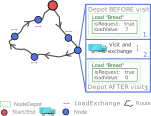
Figure: NodeDepot before and after
The report before the visit shows the NodeDepot and each of its loads. Here it is formatted for readability:
  Depot before visit:

   Id:   StoreLeverkusenDepot /
   Type: SimpleNodeDepot /

   Loads:
      [
      Id:           Bread /
      Type:         SimpleLoad /
      Desired Load
      Exchange:     7.0 /
      IsRequest:    true /
      IsFuzzy:      true /
      Priority:     1
      ]
The fields:
- Properties of the NodeDepot:
- Id: the id of the
NodeDepot(for example "StoreLeverkusenDepot"). - Type: the type of the
NodeDepot(for exampleSimpleNodeDepot). - Loads: the list of loads that the
NodeDepotcan exchange, in brackets: "Load1, Load2, ...".
- Id: the id of the
- Properties of each Load:
- Id: the id of the
Load(for example "Bread"). - Type: the type of the
Load(for exampleSimpleLoad). - Desired Load Exchange: the load value to exchange. For example, 7 "Bread" need to be delivered.
- IsRequest: whether the
NodeDepotrequests goods (true) or supplies goods (false). - IsFuzzy: whether partial deliveries and pickups are allowed.
- Priority: if several loads are exchanged, loads with a higher priority are exchanged first.
- Id: the id of the
The report after the visit has the same structure. The difference is the desired exchange value:
  Depot after visit:

   Id:   StoreLeverkusenDepot /
   Type: SimpleNodeDepot /

   Loads:
      [
      Id:           Bread /
      Type:         SimpleLoad /
      Desired Load
      Exchange:     0.0 /
      IsRequest:    true /
      IsFuzzy:      true /
      Priority:     1
      ]
Before the visit, the request was 7 "Bread", and after the visit it is 0: the visit satisfied the request of 7 units of "Bread". If the ResourceDepot had delivered only 5 units instead of 7, the NodeDepot would show a remaining request of 2.
Properties
The PND examples set the property JOptWeight.Capacity, the weight of capacity in the optimization, to tell the optimizer how much the capacity planning matters. The optimization properties page lists the key with its default.
Limits
An optimization above a certain number of elements (nodes and resources together) needs a license; see License guide: element limits.
Related examples
The PND examples are in the pickupanddelivery folder on GitHub, and the PND example page explains them:
- PNDSimpleExample: a simple PND setup
- PNDSimpleFuzzyExample: fuzzy acceptance of partial deliveries
- PNDTimedLoadExample:
TimedLoad, a time limit between pickup and delivery - PNDTimedPizzaDeliveryExample:
TimedSupplyFlexLoad, a delivery promise combined with production planning - PNDMixedFlexLoadExample:
MixedFlexLoad, a dynamic request or supply - PNDRequestAndSupplyFlexLoadExample:
RequestFlexLoadandSupplyFlexLoad - PNDBakeryChainFlexLoadExample: production planning of a bakery chain with
SupplyFlexLoad - PNDOptionalUnloadAllLoadExample:
UnloadAllLoadat optional dumps - PNDCapacityFactorExample: capacity factors
- PNDDifferentTotalCapacityUtilization: a total depot capacity shared by two load capacities, explained on the PNDDifferentTotalCapacityUtilization example page
- PNDReportExtractionExample: extracting and reading the depot reports
Related pages
- Basic elements: nodes, resources, opening hours and working hours
- Resources: the resource settings, including a resource depot
- Manufacturing planning: production planning with flexible loads
- Special features: pickup and delivery, optional nodes and the other special features
- Optimization properties: the property keys by category, with their defaults
- License guide: the free and the full licenses and their element limits
- API reference: the JSON fields of the REST service
Authors
DNA Evolutions GmbH
Added: 2026-01-03 (JOpt core 7.5.2-j17) | Last updated: 2026-10-23
Performance mode
Performance mode in JOpt.TourOptimizer, a property switch that shortens the runtime by reducing the population size and switching off several optimization operators.
Pillar nodes (CapturedNodes)
Pillar nodes in JOpt.TourOptimizer, nodes whose time windows are hard constraints that the architecture of the optimizer keeps.