Flexible Start Time (Positive and Negative)
Turning a fixed shift start into an optimizable time window
By default, a resource's route starts at a fixed point in time defined by the WorkingHours (e.g. 8:00 AM). In practice, this rigidity causes two problems. If the first node opens later than the shift start, the resource accumulates idle time. If the first node opens at shift start but driving takes 30 minutes, the resource arrives late.
FlexTime solves both problems by turning the WorkingHours start into a bounded time window that the optimizer can shift within. Positive FlexTime allows starting later (reducing idle time). Negative FlexTime allows starting earlier for driving (arriving when the first node opens). Both are hard constrained: the optimizer cannot exceed the configured maximum.
The result is more realistic schedules, less idle time, better Gantt plot appearance, and improved downstream acceptance from dispatchers and drivers.
Overview
- The mental model
- Positive FlexTime: start later
- Negative FlexTime: start earlier
- Combining positive and negative FlexTime
- Driving-only restriction and working time policy
- Related feature: early arrival at first node
- Modeling guidance
- Closing words
The mental model
A resource has WorkingHours with a fixed start time, for example 8:00 AM. Without FlexTime, the route always begins at 8:00 AM regardless of when the first node opens.
FlexTime makes this start time flexible:
- Positive FlexTime shifts the start later. If the first node opens at 10:00, the resource does not have to idle from 8:00 to 10:00. With 2 hours of positive FlexTime, the optimizer can start the route at 9:15, drive 45 minutes, and arrive at 10:00 with zero idle time.
- Negative FlexTime shifts the driving start earlier. If the first node opens at 8:00 and driving takes 30 minutes, the resource can leave at 7:30 and arrive at 8:00 ready to work, instead of arriving at 8:30.
Both types are per-resource, per-WorkingHours, and hard constrained. The optimizer uses exactly as much FlexTime as is beneficial, up to the configured maximum.
Positive FlexTime: start later
The problem
A resource starts at 8:00 AM. The first node opens at 10:00 AM. Driving takes 45 minutes. Without FlexTime, the resource leaves at 8:00, arrives at 8:45, and waits until 10:00. That is 1 hour and 15 minutes of idle time at the beginning of the shift.
The solution
With positive FlexTime, the optimizer shifts the start later:
resource.setFlexTime(Duration.ofHours(2));
The resource can now start up to 2 hours after the WorkingHours begin. The optimizer chooses the best start time. In this case, it starts at 9:15, drives 45 minutes, arrives at 10:00, and begins work immediately. Idle time drops to zero.
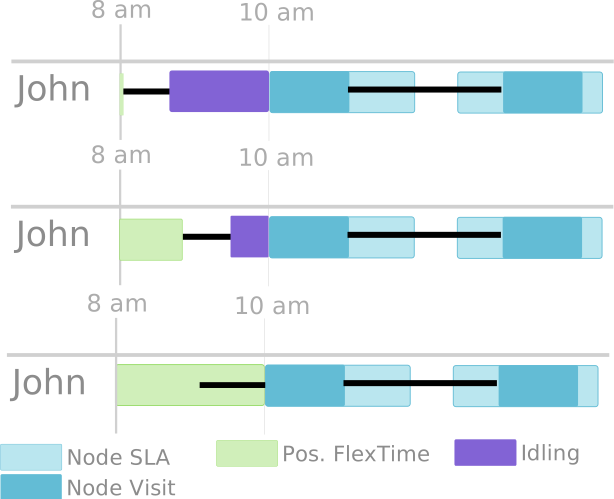
Figure 1: Three scenarios. Top: no FlexTime, full idle time. Center: 1 hour FlexTime, partial reduction. Bottom: 2 hours FlexTime, idle time eliminated.
FlexTime is hard constrained. If the configured maximum is 1 hour but the idle gap is 90 minutes, only 1 hour of delay is applied. The remaining 30 minutes remain as idle time. The optimizer never exceeds the allowed range.
Driving time inclusion
FlexTime can be configured to include or exclude driving time from the flex window. If driving time is excluded, only the "waiting" portion counts toward the FlexTime budget. This distinction matters for operations that differentiate between paid driving time and paid working time.
Negative FlexTime: start earlier
The problem
A node opens at 8:00 AM. The resource also starts at 8:00 AM. Driving to the first node takes 30 minutes. The resource arrives at 8:30. It is not technically late (if the node's time window extends beyond 8:30), but the schedule looks inefficient: the first 30 minutes of the shift are spent driving, and the node could have been served at 8:00.
The solution
With negative FlexTime, the optimizer is allowed to start driving before the official WorkingHours begin:
// Allow starting up to 1 hour earlier, driving only (no early work)
resource.setMaxRouteStartReductionTime(Duration.ofHours(1), true);
resource.setReductionTimeIsIncludedInWorkingTime(true);
The resource can now leave up to 1 hour before the WorkingHours start. In this case, it leaves at 7:30, drives 30 minutes, and arrives at 8:00 when the node opens. The workday begins with productive time, not a drive segment.
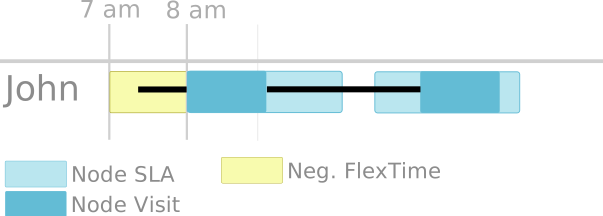
Figure 2: Without negative FlexTime, the resource arrives 30 minutes after the node opens. With negative FlexTime, it arrives exactly at opening time.
The visual effect on Gantt plots is significant. Without negative FlexTime, routes begin with long drive segments that push productive work later. With it, the first nodes of each route are neatly aligned to their opening hours.
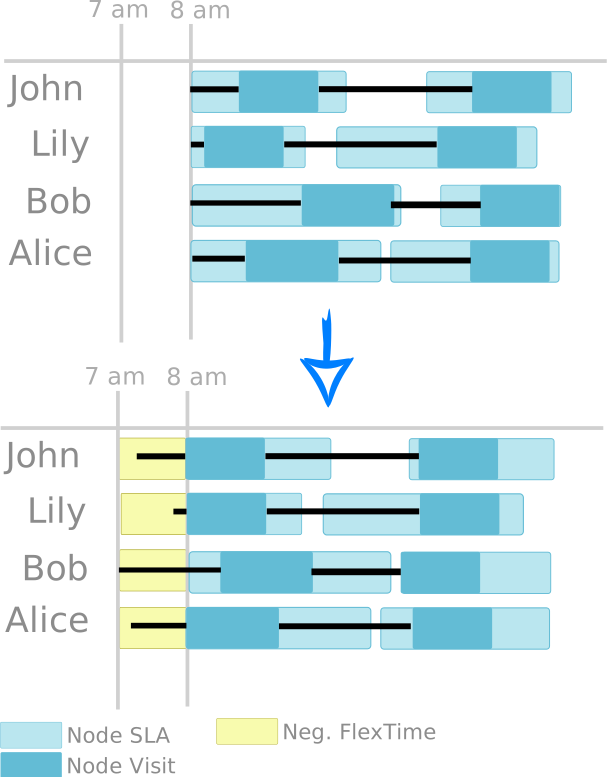
Figure 3: Four resources. Top: without FlexTime, routes look messy due to initial driving. Bottom: with negative FlexTime, first nodes are aligned to opening hours. Exception: Bob's FlexTime is not sufficient to reach his first node at opening.
Combining positive and negative FlexTime
Positive and negative FlexTime can be used together on the same resource and WorkingHours. The WorkingHours start becomes a flexible band: it may shift later to avoid idle time, or shift earlier (for driving) to align to early opening hours.
The optimizer picks the best adjustment per day, per route, based on the actual first node and travel time. On Monday, the first node might open late (positive FlexTime used). On Tuesday, it might open early (negative FlexTime used). The same resource, the same configuration, different behavior per day.
Driving-only restriction and working time policy
Negative FlexTime introduces two important policy controls:
Driving-only flag
The boolean parameter isOnlyUsedForDriving in setMaxRouteStartReductionTime(duration, isOnlyUsedForDriving) controls what the resource is allowed to do during the early start period:
// true: early time can ONLY be used for driving to the first node
resource.setMaxRouteStartReductionTime(Duration.ofHours(1), true);

// false: early time can be used for driving AND working
resource.setMaxRouteStartReductionTime(Duration.ofHours(1), false);
When set to true, the resource may leave early to position itself, but productive work does not begin until the official WorkingHours start or the node's OpeningHours, whichever applies. This models the common pattern where employees leave home earlier to drive (commute, positioning) but contractual work begins at shift start.
When set to false, the resource can use the early time for both driving and working. This is useful in operations where early starts are fully productive: the technician can leave earlier, arrive at the first node, and begin work immediately, even before the official shift start. This gives the optimizer maximum flexibility but requires that your labor policy permits early productive work.
Working time inclusion
setReductionTimeIsIncludedInWorkingTime(boolean) controls whether the early driving time counts toward the total working time budget:
// true: early driving counts as working time (common when early driving is paid)
resource.setReductionTimeIsIncludedInWorkingTime(true);
When true, the early start consumes working time capacity. This is the correct policy when early driving is paid and subject to working-time regulations. When false, the early driving is outside working time, which is less common but used in some field-service scenarios where commute time is not compensated.
These two settings together allow precise modeling of your organization's labor policy regarding early starts.
Related feature: early arrival at first node
JOpt provides a related setting called isWaitOnEarlyArrival that controls whether a resource arriving before a node's OpeningHours must wait or can begin work immediately. This interacts with FlexTime:
- If early work is allowed and positive FlexTime is used, the resource might start later and still begin working immediately on arrival (before the node's official opening).
- If waiting is required, FlexTime adjustments target the moment the node opens, not just the arrival time.
The combination of FlexTime and early-arrival policy gives full control over how the beginning of each route is handled.
Modeling guidance
Be explicit about the driving-only policy. For negative FlexTime, isOnlyUsedForDriving=true prevents productive work before the official shift start. Set it to false only if your labor policy permits early productive work. This distinction matters for compliance and payroll.
Decide whether early driving counts as working time. Use setReductionTimeIsIncludedInWorkingTime based on labor rules, payroll policy, and how you define maximum working time. Getting this wrong can produce plans that violate working-time regulations.
Use FlexTime instead of brittle cost tuning. FlexTime is an architectural feature that expands the feasible region. It should not be simulated by adjusting idle-time penalties. If you need strict behavior ("must not start before X"), model it structurally.
Pair FlexTime with realistic first-node handling. Decide whether your operation allows early work or requires waiting. Configure isWaitOnEarlyArrival accordingly.
Expect better Gantt acceptance. Negative FlexTime has a well-known visual effect: route timelines look more intuitive because first stops align to opening times. This reduces discussions like "why does every route start with a long drive?"
Closing Words
FlexTime turns a rigid shift start into a controlled, optimizable time window. Positive FlexTime reduces idle time when the first node opens late. Negative FlexTime allows early starts so the first node can be served at opening, with the choice of restricting early time to driving only or allowing both driving and working. Both are hard constrained, per-resource, per-WorkingHours, and combinable. The policy controls (driving-only flag, working-time inclusion) ensure that the flexibility respects labor regulations and organizational rules.
For the full interactive documentation, see the FlexTime section in Special Features.
Authors
A product by dna-evolutions ©