AutoFilter
Infeasibility management through multi-solution analysis
In real-world dispatch operations, infeasibility is not the exception. It is the norm. Resources are scarce, time windows conflict, capacity is tight, and data quality is imperfect. A handful of problematic nodes can destabilize the entire optimization: the solver spends its budget exploring infeasible regions, and the resulting schedule is unusable.
AutoFilter solves this. It continuously analyzes which nodes cause violations across many parallel solution candidates, identifies the systematic offenders, and removes them from the optimization. The result is a high-quality, feasible plan for the remaining nodes plus a transparent list of excluded tasks with reasons.
This is not penalty tuning. AutoFilter changes the effective problem instance during the run.
Overview
- The multi-solution penalty system
- Why this is different from penalty costs
- Smart filtering behavior
- Violation categories
- Two modes: AutoFilter and SelectiveAutoFilter
- Configuration reference
- Node-level control
- Observability
- Interaction with other features
- Practical rollout strategy
- Closing words
The multi-solution penalty system
The core mechanism of AutoFilter is a statistical analysis across many solution candidates. During the optimization run, JOpt creates a massive number of parallel solutions. Each solution is a complete schedule of all Nodes and all Resources. The AutoFilter analyzes each of these solutions for violations.
The system works with two counters per node:
- Penalty points. Each time a node causes a violation in a solution candidate, it receives penalty points. The severity depends on the violation type and the configured margins.
- Anti-penalty (non-violation occurrences). Each time a node appears in a solution without causing a violation, this is recorded as well. These occurrences act as evidence that the node is generally feasible.
The ratio between penalty points and non-violation occurrences determines whether a node is a systematic problem or just unlucky in a few solution candidates. If the ratio becomes too unfavorable, the node is filtered out.
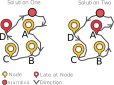
Figure: Two solutions for the same route. Node D is late in Solution One, Node A is late in Solution Two. Both accumulate penalty points. The AutoFilter identifies which node is the systematic offender across many such solutions.
This multi-solution approach is critical because infeasibility often "moves around." In one solution, Node D causes a late violation. In another permutation, Node A does. A single-solution analysis would blame whichever node happens to be the violator in the current schedule. The multi-solution analysis identifies nodes that are structurally problematic regardless of route arrangement.
Think of it as a multi-universe evaluation: the optimizer explores many parallel schedules, and the AutoFilter observes which nodes are consistently responsible for violations across these universes. A node that violates in 80% of solutions is a different problem than a node that violates in 5%. The AutoFilter distinguishes between the two.
Why this is different from penalty costs
Many optimization systems try to manage infeasibility by increasing penalty weights for violations. This has three fundamental problems:
- Oscillation. If the instance is infeasible, the algorithm keeps shifting violations from one node to another without converging. The penalty function says "stop being late here" but the solver can only comply by being late somewhere else.
- Contamination. A small set of truly infeasible outliers prevents a good plan for the feasible majority. The solver wastes its optimization budget on nodes that can never be satisfied, degrading quality for all other nodes.
- Fragility. Penalty weights must be tuned per scenario. A weight that works for 200 nodes in Berlin may fail for 300 nodes in Munich. This makes deployment brittle and hard to maintain.
AutoFilter operates on a different principle entirely. It does not increase costs. It removes the node from the problem. The solver then optimizes freely for the remaining nodes, producing a feasible, high-quality plan. The removed nodes are reported with their filter reasons so the business can take action: relax time windows, add resources, or defer the task to the next day.
Smart filtering behavior
AutoFilter is not a blunt instrument. It includes several intelligent behaviors that go beyond simple threshold-based removal:
Route reordering before filtering. Before removing a node, the AutoFilter checks whether rearranging the route can resolve the violation. If a different visit order eliminates the problem, the node stays. Filtering is a last resort, not a first response.
Priority-aware substitution. Nodes can carry importance values. When filtering is necessary, AutoFilter prefers to remove low-priority nodes over high-priority ones. If removing a low-priority node resolves the violation that a high-priority node is causing, the low-priority node is filtered instead. This means contractually important tasks are protected at the expense of optional or deferrable work.
Collective penalization with importance threshold. When an entire route exceeds working hours or maximum distance, all nodes on that route receive penalty points. However, nodes with importance above a configurable threshold (JOpt.AutoFilter.collectivePenalization.maxImportance) are exempt from this collective penalty. This prevents high-value tasks from being punished for route-level problems they did not cause.
Graceful filtering. The property JOpt.AutoFilter.tryGracefulNodeFiltering (default: true) enables a check after identifying nodes for filtering: if unassigning only a subset of the candidates is sufficient to resolve the violation, the remaining candidates are kept. This minimizes the number of excluded nodes.
Cluster protection. When nodes are part of a joined-visit-duration cluster (co-located tasks), the property JOpt.AutoFilter.tryAvoidSplittingJoinedClusters can prevent the AutoFilter from breaking apart these clusters unnecessarily.
Strict mode on last execution. By default, the AutoFilter applies a strict filtering pass on its last execution (JOpt.AutoFilter.useStrictFilterOnLastExecution). This ensures the final solution is stabilized: any nodes that are still causing violations after the full optimization run are removed in this final pass.
Violation categories
AutoFilter can be configured to react to specific types of violations. Each category can be independently enabled or disabled through the SelectiveAutoFilter properties.
| Category | Property | What it detects |
|---|---|---|
| Late arrival | SelectiveAutoFilter.TimeWindow.Late | Node visited after its time window closes |
| Early arrival | SelectiveAutoFilter.TimeWindow.Early | Node visited before its time window opens |
| Working hours exceeded | SelectiveAutoFilter.WorkingHoursExceeded | Route exceeds the resource's shift duration |
| Route distance exceeded | SelectiveAutoFilter.MaximalRouteDistanceExceeded | Route exceeds the resource's maximum distance |
| Capacity overload | SelectiveAutoFilter.CapacityOverload | Vehicle capacity exceeded |
| Resource mismatch | SelectiveAutoFilter.ResourceMismatch | Node served by wrong resource (skill, preferred, mandatory) |
| Node type mismatch | SelectiveAutoFilter.NodeType | Node served by wrong resource type |
| Relationship violation | SelectiveAutoFilter.RelationShip | Node violates a relation constraint (same route, same visitor, time) |
| Double booking | SelectiveAutoFilter.DoubleBooking | Node potentially assigned to multiple resources |
Each category can be combined with margins that define the tolerance threshold. For example, a late arrival margin of 120 seconds means the AutoFilter only counts a violation if the arrival is more than 2 minutes late. This prevents filtering for negligible deviations that are operationally acceptable.
Certain violation types (such as late or early arrival) can also be configured to trigger instant filtering, bypassing the statistical accumulation and removing the node immediately.
Two modes: AutoFilter and SelectiveAutoFilter
JOpt provides two activation modes:
Full AutoFilter
props.setProperty("JOpt.AutoFilter", "TRUE");
Enables the AutoFilter with default behavior. The system decides which violations contribute to filtering.
Selective AutoFilter (recommended)
props.setProperty("JOpt.SelectiveAutoFilter", "TRUE");
props.setProperty("JOpt.SelectiveAutoFilter.TimeWindow.Late", "TRUE");
Enables AutoFilter but only for explicitly chosen violation categories. This is the recommended approach for production use because it gives full control over what can trigger filtering. Start with one category (typically late arrival), observe the results, and expand as needed.
Configuration reference
Switches
| Property | Default | Description |
|---|---|---|
JOpt.AutoFilter | FALSE | Master switch for AutoFilter |
JOpt.SelectiveAutoFilter | FALSE | Selective mode (category-by-category control) |
JOpt.AutoFilter.useStrictFilterOnLastExecution | TRUE | Strict filtering pass on final execution |
JOpt.AutoFilter.tryGracefulNodeFiltering | TRUE | Remove only as many nodes as needed |
JOpt.AutoFilter.tryAvoidSplittingJoinedClusters | FALSE | Protect co-located task clusters |
JOpt.AutoFilter.canDisableNodeProtection | TRUE | Allow removing protection after threshold |
JOpt.AutoFilter.usePostOptimizationAfterStrictFiltering | TRUE | Continue optimizing after strict filtering |
Margins
| Property | Default | Unit | Description |
|---|---|---|---|
JOpt.AutoFilter.LateArrivalMargin | 0 | seconds | Tolerance for late arrival |
JOpt.AutoFilter.EarlyArrivalMargin | 0 | seconds | Tolerance for early arrival |
JOpt.AutoFilter.WorkingHoursExceedMargin | 0 | seconds | Tolerance for overtime |
JOpt.AutoFilter.RouteDistanceExceedMargin | 0 | meters | Tolerance for overdistance |
Result events
| Property | Default | Description |
|---|---|---|
JOpt.AutoFilter.beforeFilteringResult | FALSE | Emit a result snapshot before filtering |
JOpt.AutoFilter.afterFilteringResult | FALSE | Emit a result snapshot after filtering |
Node-level control
AutoFilter can be applied globally or targeted to specific nodes. The node-level approach is recommended for production scenarios where not all tasks are equally deferrable.
Protecting nodes from filtering
Individual nodes can be marked as protected. A protected node will not be filtered regardless of its violation count. Use this for contractually mandatory tasks.
Targeting specific nodes
A local IAutoFilterNodeConstraint can be attached to individual nodes. Only these nodes are subject to the specific filtering rule.
// Create a late filter constraint
IAutoFilterNodeConstraint lateFilter = new LateAutoFilterConstraint();

// Attach only to the deferrable node
List<IAutoFilterNodeConstraint> constraints = new ArrayList<>();
constraints.add(lateFilter);
nuernberg.setAutoFilterConstraints(constraints);
This pattern is recommended for:
- Nodes representing optional or low-priority work
- Unconfirmed appointments that may be deferred
- Tasks from external systems where data quality is uncertain
Observability
In production, AutoFilter is only safe if it is fully transparent. JOpt provides two observability surfaces for capturing filter events:
Callback-style
void onNodeFiltering(int code, String message, List<INodeFilterReason> filterReasons)
Each INodeFilterReason provides the node, the violation category, and the severity. This is suitable for structured logging, error reporting pipelines, and post-processing analysis.
Event-style
void onNodeFiltering(NodeFilteringEvent nodeFilteringEvent)
This supports event streaming, telemetry integration, and real-time UI status updates.
Recommended practice:
- Map
INodeFilterReasonto your domain identifiers (order ID, customer ID). - Persist filtered nodes as "unplanned tasks" with reason codes.
- Trigger re-dispatch workflows: manual review, next-day planning, or adding a resource.
Interaction with other features
AutoFilter and Pillar Nodes
Pillars (CapturedNodes) enforce SLAs by architecture. AutoFilter manages infeasibility by removal. These two are complementary: use Pillars for "must meet SLA" contracts, use AutoFilter when you accept "best possible plan" under infeasibility. A Pillar can be protected from AutoFilter filtering.
AutoFilter and cost weights
Cost weights (JOptWeight.*) determine preference among feasible or near-feasible solutions. AutoFilter changes which nodes are even considered. Tune weights to improve solution quality. Enable AutoFilter when you must handle infeasible inputs robustly.
AutoFilter and resource constraints
When resource mismatch filtering is enabled, nodes that are systematically assigned to the wrong resource (violating mandatory or preferred constraints) accumulate penalty points. This is useful for identifying tasks that cannot be served by the available workforce given current skill and territory constraints.
Practical rollout strategy
Step 1. Decide your policy. AutoFilter is appropriate when the business can accept a feasible plan for most nodes plus a list of excluded tasks. If all tasks must be scheduled, fix feasibility instead (add resources, relax windows).
Step 2. Start with SelectiveAutoFilter and one category, typically late arrival. Observe which nodes get filtered and how often.
Step 3. Add margins that reflect operational tolerance. If 2 minutes late is acceptable, set the late margin to 120 seconds. This prevents unnecessary exclusions.
Step 4. Use node-level constraints for optionality. Mark truly mandatory tasks as protected. Apply filtering constraints only to deferrable work.
Step 5. Operationalize the result. Build a standard post-processing contract: planned tasks (routes), filtered tasks (with reasons), and remaining violations (if any soft constraints are allowed).
Closing Words
AutoFilter converts over-constrained, infeasible planning problems into usable schedules with transparent exclusion lists. Its multi-solution penalty system identifies nodes that are structurally problematic, not just unlucky in the current solution. The smart filtering behaviors (reordering, priority substitution, graceful filtering) ensure that exclusion is a last resort and that high-value tasks are protected.
To our best knowledge, no other route optimization engine provides a built-in mechanism that dynamically analyzes parallel solution candidates, accumulates violation statistics per node, and structurally removes the worst offenders during the optimization run. Other solvers would either fail to converge, produce heavily violated schedules, or require the user to manually identify and remove problematic nodes before optimization.
For further reading, see the AutoFilter section in Special Features and the Optimization Properties reference.
Authors
A product by dna-evolutions ©
Simplified Angular Demo Client
Feature guide — TypeScript/Angular end-to-end demo client for JOpt.TourOptimizer
Backup-Connector
Automatically calculated distances and driving-times between Nodes and Resources are usually sufficient to solve an optimization problem. By default, a direct line between two elements is drawn to calculate the distance. Follow this direct line, the driving-time is calculated by setting an average speed. The BackupConnector can manipulate the calculations, account for external conditions, or completely exchange the algorithm used to calculate a connection.