API and clients
JOpt.TourOptimizer has one REST API in both modes. Every server describes its API in an OpenAPI schema, and clients in any language can be generated from that schema. This page lists the endpoint groups, the headers, the JSON model of an optimization and the example clients.
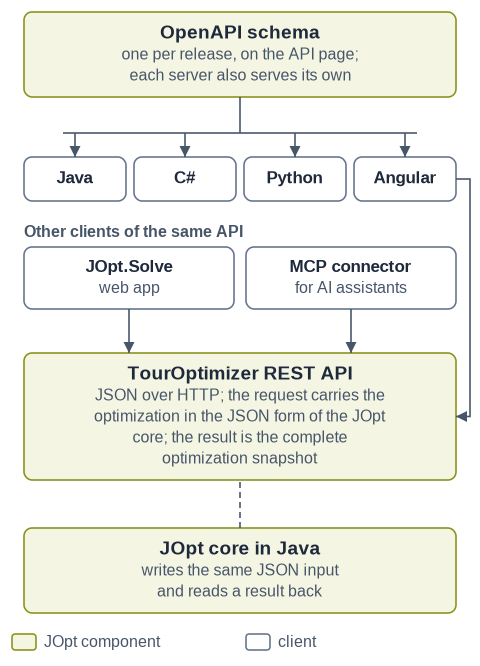
The diagram opens full size on click.
The OpenAPI schema
- Every TourOptimizer server serves its OpenAPI schema at
/v3/api-docsand the Swagger UI for it, unless the operator switched them off (Settings). - The schema of each TourOptimizer release is on the API page, where you can read it and download it.
- The schema is the contract: an operation, a field or a reason code that is not in the schema of your release is not part of the API.
Endpoint groups
| Group | Endpoints | Modes |
|---|---|---|
| Jobs | POST /api/v1/jobs to submit, then GET /api/v1/jobs/{jobId}/state, /result, /solution, /status, /progress, /warnings, /errors; POST /api/v1/jobs/{jobId}/stop and /cancel; DELETE /api/v1/jobs/{jobId} | Both |
| Intermediate results | POST and GET /api/v1/jobs/{jobId}/request-result: the best result so far, while the job keeps running | Both |
| Search | POST /api/v1/jobs/state/search, /api/v1/jobs/status/search and /api/v1/jobs/search | Both |
| Job export | GET /api/v1/jobs/{jobId}/export: the stored result as a ZIP archive | Both |
| Synchronous runs and live streams | POST /api/v1/runs, then GET /api/v1/runs/{runId}/result or /solution, the server-sent event streams under /api/v1/runs/{runId}/stream/, and DELETE /api/v1/runs/{runId} | Trusted mode |
| Job import | POST /api/v1/jobs/import: stores a result that was computed elsewhere, without a run | Trusted mode |
| Geo data | POST /api/v1/jobs/withGeoProvider: a job whose distances and driving times come from GeoCoderRouter | Auth mode, in the JOpt Platform stack |
| Geocoding | POST /api/geocode/geoCode: a geocoding request, answered by GeoCoderRouter | Auth mode, in the JOpt Platform stack |
| Routes | POST /api/routing/solution: the turn-by-turn routes of an optimization result, from GeoCoderRouter | Auth mode, in the JOpt Platform stack |
| Account plan | GET /api/account/plan: the plan of the signed-in account | Auth mode |
| Health | GET /api/v1/health | Both |
How a job flows through these endpoints is on Jobs.
Headers
| Header | Use | Modes |
|---|---|---|
X-Tenant-Id | The tenant of the request. All stored data is scoped to it. | Trusted mode: your backend sends it. Auth mode: TourOptimizer sets it from the token and overwrites a sent value. |
Authorization: Bearer ... | The access token of the signed-in user or client | Auth mode |
Idempotency-Key | Makes a submit safe to retry: the same key with the same body returns the same jobId | Both |
X-Encryption-Secret | Reads a result that the client encrypted with its own secret | Trusted mode |
A refusal answers with an HTTP status and a reason code in the body. The codes are on Checks and limits.
The JSON model of an optimization
A request body is the JSON form of an optimization of the JOpt core. It holds the input (nodes, resources, constraints and properties) and, after a run, the solution. Its extension carries what belongs to the server and not to the optimization itself:
| Field | What it holds |
|---|---|
extension.keySetting | The JOpt license of the request (trusted mode; see Settings) |
extension.timeOut | The max run time as an ISO 8601 duration such as PT30M, or UNLIMITED; counted from the start of the run |
extension.persistenceSetting | How the job is stored: the keep time (expiry), the completion webhook and, in trusted mode, the encryption secret of the client |
TourOptimizer removes the license, the webhook signing secret and the encryption secret before it stores a job, and never returns them in a result.
A Java program can turn an optimization of the JOpt core into this JSON and read the JSON back into the core:
- Create JSON input from an optimization, with or without its solution
- Read JSON and run it in the core library
Example clients
The example clients were generated from the OpenAPI schema. Each repository has a README with the setup.
| Language | Repository |
|---|---|
| Java | Java-REST-Client-Examples |
| C# | C-Sharp-REST-Client-Examples |
| Python | Python-REST-Client-Examples |
| Angular | Angular-Demo-Application-Source |
To generate a client in another language, download the schema of your release from the API page and run an OpenAPI generator on it.
Video tutorials
Two videos show the Java REST client:
- TourOptimizer as a service (REST), part 1: JSON written by hand and sent to TourOptimizer
- TourOptimizer as a service (REST), part 2: JSON built with the generated models and sent to TourOptimizer
Related pages
- Overview: what TourOptimizer is and what differs between the modes
- Jobs: submit, queue, run, state and result
- Checks and limits: the reason codes of a refusal
- REST examples: the example pages of the REST clients
Added: 2026-11-27 | Last updated: 2026-11-27