Running on Azure or AWS
The JOpt Platform stack is built from containers and standard backing services, so it can run on a cloud platform as well as on an own host. This page shows three ways to run it on Microsoft Azure or Amazon Web Services, which managed service can take the place of which part of the stack, and how the TourOptimizer copies can scale on the job queue.
What makes the stack portable
- Every service is a container, and a host differs only in its settings file. No host name is written into the code or the images.
- The backing services are standard: MongoDB, Redis and OpenID Connect for sign-in.
- Scaling follows a metric of the stack, the number of waiting jobs (
jopt_queue_jobs), not a tool of one vendor.
Three ways to run it
| Way | What it means | Fits |
|---|---|---|
| One virtual machine per stack (Azure Virtual Machines, Amazon EC2) | The same compose stack as on an own host, on a rented machine | A first cloud setup with the least change |
| Managed containers (Azure Container Apps, Amazon ECS on AWS Fargate) | Each service as a managed container, with managed databases | Automatic scaling on the queue and less server maintenance |
| Kubernetes (Azure Kubernetes Service, Amazon EKS) with KEDA | Full orchestration | Many tenants or strict corporate rules, with the most operations effort |
What maps to what
| Part of the stack | Azure | AWS |
|---|---|---|
| Containers (Docker Compose) | Azure Container Apps or Azure Kubernetes Service | Amazon ECS on AWS Fargate or Amazon EKS |
| Entry and TLS (Caddy) | Azure Front Door or Azure Application Gateway, with a web application firewall | Amazon CloudFront with AWS WAF, and an Application Load Balancer |
| MongoDB | MongoDB Atlas on Azure, or Azure DocumentDB (with MongoDB compatibility) | MongoDB Atlas on AWS, or Amazon DocumentDB |
| Redis | Azure Managed Redis | Amazon ElastiCache (Valkey or Redis OSS) |
| Secret store (Infisical) | Keep Infisical, or Azure Key Vault | Keep Infisical, or AWS Secrets Manager |
| Sign-in (Keycloak) | Keep Keycloak | Keep Keycloak |
| Metrics and dashboards (Prometheus, Grafana) | Azure Monitor managed service for Prometheus, Azure Managed Grafana | Amazon Managed Service for Prometheus, Amazon Managed Grafana |
Notes on the table:
- The images stay the same on every platform.
- MongoDB Atlas runs MongoDB itself. The MongoDB-compatible services need a full test run of the stack first. Amazon DocumentDB supports GridFS, which the job queue uses, on instance-based clusters and not on elastic clusters.
- Microsoft retires Azure Cache for Redis: the tiers Basic, Standard and Premium on 30 September 2028, Enterprise and Enterprise Flash on 31 March 2027. Azure Managed Redis is its successor.
- Azure DocumentDB (with MongoDB compatibility) is the current name of the service formerly called Azure Cosmos DB for MongoDB (vCore).
- Azure Key Vault or AWS Secrets Manager in place of Infisical needs an adapter in TourOptimizer.
- Keycloak runs on every platform as a container. A managed identity service in its place needs mapping work for the claims that carry the tenant.
The two diagrams show the design on Azure and on AWS.
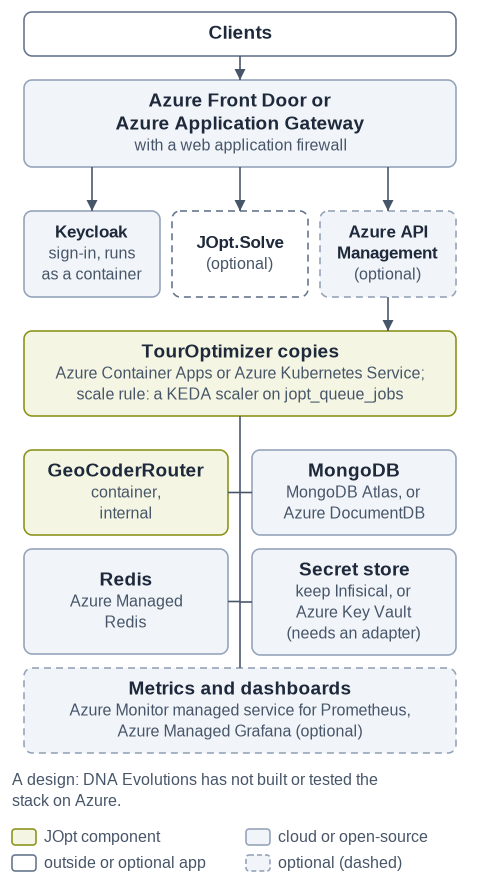
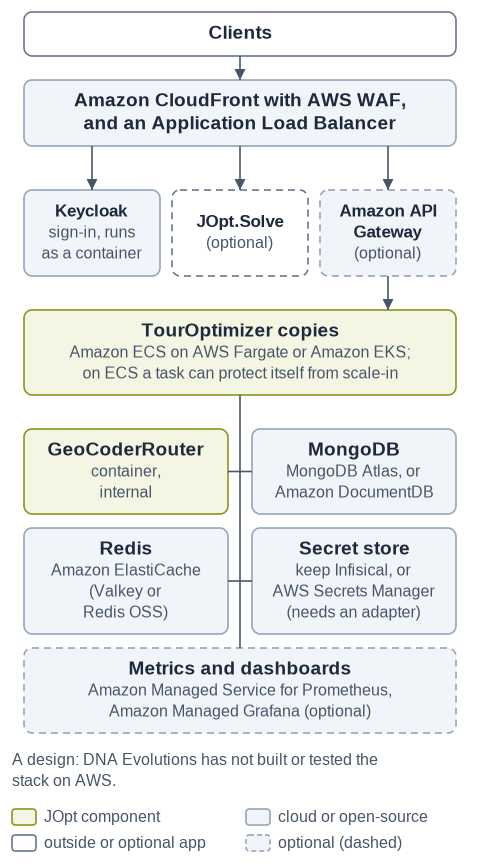
The diagrams open full size on click.
Scaling on the job queue
- Azure Container Apps: a custom scale rule can use any KEDA scaler based on a ScaledObject, for example one that reads
jopt_queue_jobsfrom Prometheus. An app can also scale to zero. - Kubernetes: KEDA can scale the TourOptimizer copies on the same metric.
- Long runs: an optimization can run for a long time, and a cloud autoscaler does not know which copy is busy. On Amazon ECS a task can protect itself from scale-in through the task scale-in protection endpoint, for 2 hours by default and up to 48 hours. On Azure Container Apps and Kubernetes the drain of a TourOptimizer copy and the requeue rule cover this: a copy that stops hands its running jobs back to the queue.
- Separate services for the accepting and the running copies let the platform scale the running copies on their own.
An API gateway in front of TourOptimizer
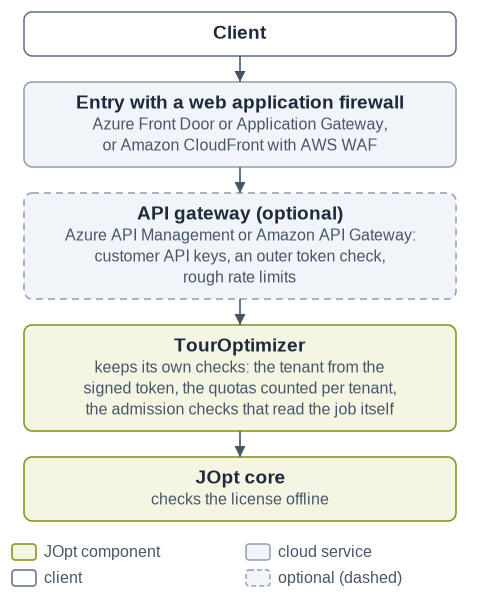
The diagram opens full size on click.
Azure API Management or Amazon API Gateway can be added in front of TourOptimizer as an extra layer, for customer API keys, an outer token check and rough rate limits. TourOptimizer keeps its own checks behind the gateway: the tenant comes from the signed token, the quotas are counted per tenant in TourOptimizer, and the admission checks read the job itself. The JWT authorizer of Amazon API Gateway for HTTP APIs accepts only RSA-based signature algorithms, so the identity provider must sign its tokens with RSA.
Customers in their own cloud
A customer who runs TourOptimizer in trusted mode can use the same TourOptimizer image in an own cloud account, without Keycloak and without a secret store. The JOpt core checks the license offline, so no connection to DNA Evolutions is needed for it.
Vendor sources
- Azure Container Apps: scaling
- Azure Cache for Redis retirement FAQ
- Azure DocumentDB overview
- Azure Monitor managed service for Prometheus
- Amazon ECS task scale-in protection endpoint
- Amazon DocumentDB: supported MongoDB APIs
- Amazon API Gateway: JWT authorizers for HTTP APIs
- Amazon Managed Service for Prometheus
- KEDA: Prometheus scaler
- Azure Web Application Firewall on Azure Front Door
- Azure Web Application Firewall on Azure Application Gateway
- AWS WAF
- Azure API Management: validate-jwt policy
- Amazon API Gateway: usage plans and API keys
Related pages
- JOpt Platform overview: the components, their images and what is optional
- Jobs: the queue and the copies: the queue, the copies and the drain
- Platform operations: how the stack runs on one host
- Kubernetes: TourOptimizer in trusted mode on Kubernetes
Added: 2026-11-27 | Last updated: 2026-11-27