JOpt.TourOptimizer in trusted mode
In trusted mode, JOpt.TourOptimizer trusts the backend that calls it. Your backend signs in its users, sends the tenant in the header X-Tenant-Id and sends the JOpt license with each job. TourOptimizer runs as a container and needs no sign-in service, no secret store and no Redis. Trusted mode is the default: TourOptimizer runs in it unless the Spring profile auth is set.
This section shows how to run TourOptimizer in trusted mode on Linux, Windows, macOS and Kubernetes. What TourOptimizer does, its API, its jobs and its settings, is described in the JOpt.TourOptimizer section.
Three setups
The diagram opens full size on click.
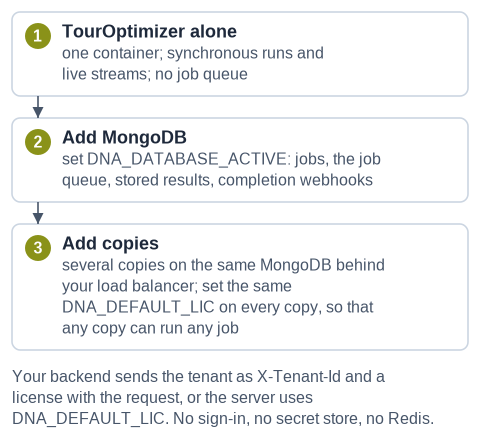
The diagram shows three setups, each one built on the one before:
- TourOptimizer alone. One container answers synchronous runs and live streams. A synchronous run keeps its result in the memory of the container, never in a database, and there is no job queue.
- TourOptimizer with MongoDB. With
DNA_DATABASE_ACTIVE=trueand the connection string inDNA_DATABASE_URI, TourOptimizer adds jobs, the job queue, stored results and completion webhooks. - Several copies. Several copies of TourOptimizer share one MongoDB and one job queue behind your load balancer. Any copy accepts a submit, and a copy with a free run place claims the next job. A job that brings its own license runs only on the copy that accepted it (Jobs: the queue and the copies). With several copies, set the same
DNA_DEFAULT_LICon every copy and send the jobs without a license of their own.
The note at the bottom of the diagram names what holds in all three setups: the tenant and the license come from your backend, and no sign-in service, secret store or Redis takes part.
When to use trusted mode
Use trusted mode when your own backend already handles sign-in, tenants and licenses, and only that backend calls TourOptimizer. TourOptimizer takes the header X-Tenant-Id as sent, so place it in a network where no other client can reach it. To protect it further, DNA_SECURITY_ENABLED=true makes every request send a user name and password (Settings: access protection).
If users or clients must sign in to TourOptimizer itself, or tenants need plans, quotas and licenses from a secret store, use auth mode in the JOpt Platform stack. Choose a mode compares the two.
What trusted mode needs and does not need
| Part | In trusted mode |
|---|---|
| Docker or another container runtime | Needed: TourOptimizer is the image dnaevolutions/jopt_touroptimizer |
| JOpt license | With each job, or the default license DNA_DEFAULT_LIC of the server |
| MongoDB | Needed for jobs, the job queue, stored results and webhooks; not needed for synchronous runs |
| Sign-in service (Keycloak) | Not used: TourOptimizer reads no token |
| Secret store (Infisical) | Not used: the license comes from the request or from the setting |
| Redis | Not used: trusted mode has no rates and no quotas |
Where the license comes from
Each job carries its JOpt license in extension.keySetting.jsonLicense. A job without one runs with the license in DNA_DEFAULT_LIC, and each such use writes a warning to the log. A job with neither is refused with 403 LICENSE_MISSING. See Settings: license.
Without a license the JOpt core runs with its free license and its element limits (License guide: element limits).
The tenant
Your backend sends the tenant of each request in the header X-Tenant-Id. TourOptimizer takes it as sent and scopes all stored data to it: a job is read with its jobId together with its tenant (Jobs).
Setups by platform
- Linux: Docker Engine,
docker runand Docker Compose with MongoDB - Windows: virtualization, WSL 2 and Docker Desktop, then the same container
- macOS: Docker Desktop for Mac, on Intel and Apple silicon
- Kubernetes: a Deployment, a Service, health probes and a Secret for the license
Related pages
- JOpt.TourOptimizer overview: what TourOptimizer does in both modes
- Settings: every setting with its default
- Choose a mode: the Java SDK, trusted mode or auth mode
- JOpt Platform: TourOptimizer in auth mode
Added: 2026-11-27 | Last updated: 2026-11-27
Choose a mode
The three ways to run JOpt compared, the Java SDK in your own application, JOpt.TourOptimizer in trusted mode behind your backend, and JOpt.TourOptimizer in auth mode in the JOpt Platform stack.
Linux
Run JOpt.TourOptimizer in trusted mode on Linux with Docker Engine, alone or with MongoDB for jobs.