JOpt.TourOptimizer on Kubernetes
This page runs several copies of JOpt.TourOptimizer in trusted mode on Kubernetes. The manifest below is a starting point: adapt the names, the resources and the access to your cluster.
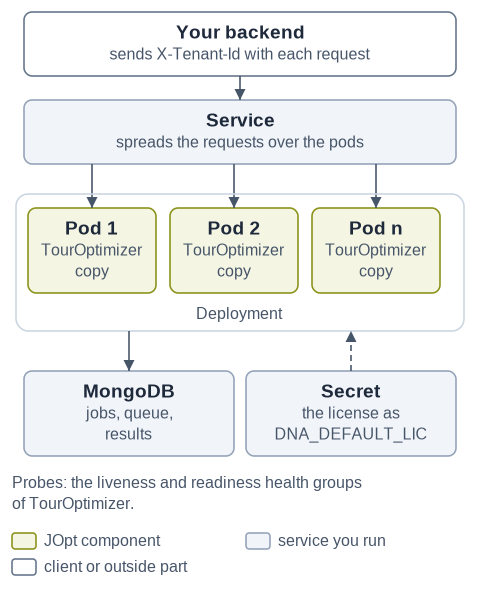
The diagram opens full size on click.
Your backend calls a Kubernetes Service, which spreads the requests over the TourOptimizer pods of a Deployment. The pods share one MongoDB for jobs and the job queue: any pod accepts a submit, and a pod with a free run place claims the next job (Jobs: the queue and the copies). Each pod reads the default license from a Secret as DNA_DEFAULT_LIC, and the probes of Kubernetes read the health groups of TourOptimizer.
Before you start
- A Kubernetes cluster whose nodes run
linux/amd64, the architecture of the image. - A MongoDB that every pod reaches, for example a managed MongoDB service or one run by an operator in the cluster. It is not part of this manifest.
- Your JOpt license as JSON text.
The Secret
The Secret holds the default license and the connection string of MongoDB:
kubectl create secret generic jopt-touroptimizer \
  --from-file=DNA_DEFAULT_LIC=license.json \
  --from-literal=DNA_DATABASE_URI='mongodb://<user>:<password>@<mongodb-host>:27017/?authSource=admin'
With several copies, send the jobs without a license of their own: a job that brings its own license runs only on the pod that accepted it, and ends with ERROR if that pod stops before the job ends.
The Deployment and the Service
apiVersion: apps/v1
kind: Deployment
metadata:
  name: jopt-touroptimizer
spec:
  replicas: 2
  selector:
    matchLabels:
      app: jopt-touroptimizer
  template:
    metadata:
      labels:
        app: jopt-touroptimizer
    spec:
      containers:
        - name: touroptimizer
          image: dnaevolutions/jopt_touroptimizer:2.1.0
          ports:
            - containerPort: 8081
          env:
            - name: DNA_DATABASE_ACTIVE
              value: "true"
          envFrom:
            - secretRef:
                name: jopt-touroptimizer
          resources:
            requests:
              cpu: "2"
              memory: 4Gi
            limits:
              memory: 4Gi
          livenessProbe:
            httpGet:
              path: /actuator/health/liveness
              port: 8081
            initialDelaySeconds: 40
            periodSeconds: 30
          readinessProbe:
            httpGet:
              path: /actuator/health/readiness
              port: 8081
            initialDelaySeconds: 20
            periodSeconds: 10
---
apiVersion: v1
kind: Service
metadata:
  name: jopt-touroptimizer
spec:
  selector:
    app: jopt-touroptimizer
  ports:
    - port: 8081
      targetPort: 8081
- Image. Pin the version tag; the tags are listed on Docker Hub. The image runs TourOptimizer as the user
jopt, not as root. - Memory. The Java heap takes up to 75 percent of the memory limit of the container. Size the limit for the largest problem you send, and give the request the same value, so a pod is not moved for lack of memory during a run.
- Probes.
/actuator/health/livenessanswers while the process runs./actuator/health/readinessanswers503unless every member isUP; with the job database, its members include the quarantine of the queue. Both groups show the names and states of their members, never details. - Service. The Service type
ClusterIP(the default) keeps TourOptimizer inside the cluster. TourOptimizer takes the headerX-Tenant-Idas sent, so only your backend may reach it; a NetworkPolicy can enforce that. To protect it further, setDNA_SECURITY_ENABLED=true(Settings: access protection). - API documentation. Add
DNA_SWAGGER_UI_ENABLED=falseandDNA_API_DOCS_ENABLED=falsetoenvwhen callers outside your team can reach the pods (Settings: API documentation).
Apply both files with kubectl apply -f, then check the pods with kubectl get pods -l app=jopt-touroptimizer.
Rolling updates
Change the image tag and apply the Deployment again. Kubernetes replaces the pods one after the other and sends requests only to pods whose readiness probe answers UP. A job whose pod is lost while it runs goes back to the queue once and starts over (Jobs).
Related pages
- Trusted mode: the three setups and what the mode needs
- Jobs: submit, queue, run, read and keep a job
- Checks and limits: what a copy refuses and why
- Settings: every setting with its default
Added: 2026-11-27 | Last updated: 2026-11-27
macOS
Run JOpt.TourOptimizer in trusted mode on macOS with Docker Desktop for Mac, on a Mac with an Intel processor or with Apple silicon.
JOpt Platform overview
The JOpt Platform stack that runs JOpt.TourOptimizer in auth mode, its components, their container images and the open-source building blocks it runs on.