MCP connector

The JOpt MCP connector is a server for the Model Context Protocol (MCP). It lets an AI assistant plan routes with JOpt.TourOptimizer. The assistant describes the places, their time windows and the vehicles or field workers. The connector sends the problem to the job API of TourOptimizer, waits a bounded time and returns a readable plan with the routes as structured data.
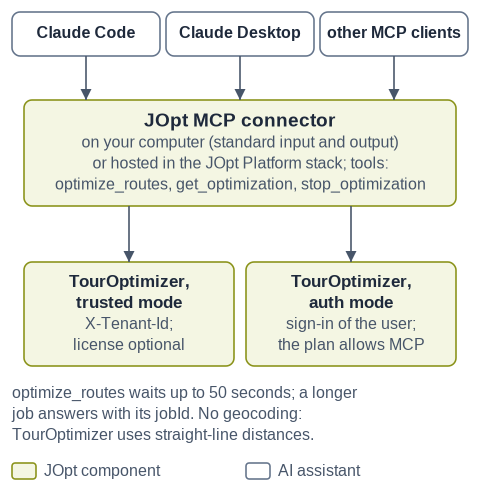
The diagram opens full size on click.
An MCP client, such as Claude Code or Claude Desktop, talks to the connector. The connector runs on your computer or hosted in the JOpt Platform stack, and it offers three tools. It sends the jobs to TourOptimizer: in trusted mode with the tenant in the X-Tenant-Id header, in auth mode under the sign-in of the user. The connector does no geocoding, and TourOptimizer plans with straight-line distances.
The tools
| Tool | What it does |
|---|---|
optimize_routes | Submits a problem and waits up to 45 seconds by default, at most 50. A finished run returns the plan; a longer run returns its jobId. |
get_optimization | The state, the progress or the result of a job, optionally after a wait. |
stop_optimization | Stops a running job and returns the best result so far, or cancels a queued job. |
The input of optimize_routes:
- The time zone of every time, as an IANA zone such as
Europe/Berlin. - The places, each with an id, its latitude and longitude, the visit time in minutes and its time windows in local wall-clock time. A place can have a priority and can be optional.
- The vehicles or workers, each with an id, a start position and its shifts. An end position, the maximum hours and kilometers per shift and an average speed are optional.
- The run time in seconds (30 by default) and the wait time.
The connector checks the input before it sends anything. Impossible dates, time windows that end before they start, duplicate ids and similar problems come back together in one message, so the assistant can correct them in one step.
The plan comes from JOpt
The connector tells the assistant to send the whole problem, with all vehicles or workers and all places, in one optimize_routes call, because JOpt decides which of them takes which place. The assistant shows the plan of JOpt unchanged and marks any change of its own as a suggestion. To change the plan, it changes the input and calls again.
The result starts with the source of the plan and its job id, the assignment of the places, and every vehicle or worker that is not used, with the reason. Then follow the totals, the route tables, the places that are not planned and a note on the distances. The structured result starts with the same lines, for clients that read only the structured part.
Coordinates and distances
- The connector does no geocoding. For places it knows, the assistant gives the coordinates from its own knowledge, and the result lists them as approximate. For places it does not know, the assistant asks the user.
- The connector sends no road network data. TourOptimizer computes straight-line connections at the average speed of each vehicle or worker, 79.2 km/h by default, so the driving times are estimates. Every result says so.
Two ways to run it
| Way | How the client reaches it | Mode of TourOptimizer |
|---|---|---|
| On your computer | The MCP client starts the connector as a process and talks to it over standard input and output, one process per assistant session. Claude Code reads the entry from the .mcp.json of a project or adds it with claude mcp add; Claude Desktop reads the same entry from claude_desktop_config.json. The connector needs Node.js 20 or newer. | Trusted mode or auth mode |
| Hosted in the JOpt Platform stack | The MCP client connects to the address of the connector and signs the user in at the stack. | Auth mode |
Each connector works with one TourOptimizer.
Trusted mode
In trusted mode the connector sends the tenant in the X-Tenant-Id header and, when one is set, a license. Without a license in the request, TourOptimizer uses its own default license, if it has one. Claude Desktop keeps the settings of the connector in its file as written, so use a license meant for that computer there, or auth mode. Trusted Mode describes TourOptimizer in this mode.
Auth mode
In auth mode the user signs in at the identity provider in the browser. The connector refreshes the token before it expires. TourOptimizer takes the tenant from the token, uses the license of that tenant and ignores a license in the request. It lets the calls of the connector through only for a tenant whose plan allows the MCP connector, both for the connector on your computer and for the hosted one. The plan page of the account (GET /api/account/plan) names the address of the hosted connector to a plan that includes it. Who calls whom shows sign-in and tenant in the JOpt Platform.
Limits
- No geocoding and no road network: the coordinates come from the assistant or the user, the distances are straight lines.
- A license limit or a size limit is reported to the user. The connector asks the assistant not to split the problem on its own.
- The text of a very large plan lists the first 200 stops; the structured result holds all of them.
Access
To use the MCP connector, contact DNA Evolutions through the contact page.
Related pages
- JOpt AI Expert: answers JOpt questions and writes JOpt code
- Jobs: the job API that the connector uses
- Choose a mode: trusted mode and auth mode compared
- JOpt Platform overview: the stack that hosts the connector
Added: 2026-11-27 | Last updated: 2026-11-27