JOpt.TourOptimizer overview
JOpt.TourOptimizer is a Spring Boot application on Spring WebFlux that serves the JOpt core over REST. A client sends an optimization as JSON, TourOptimizer runs it with the JOpt core and keeps the result for the client to read. One container image runs in one of two modes. In trusted mode your own backend handles sign-in, tenants and licenses. In auth mode the JOpt Platform stack handles them.
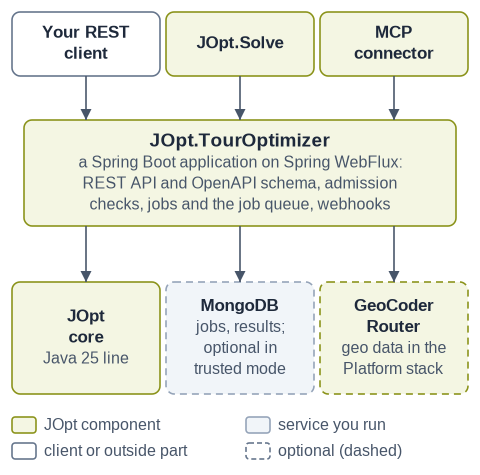
The diagram opens full size on click. The JOpt core itself, its lines and its use in your own Java application are in JOpt.Core.
This section describes TourOptimizer in both modes: its API, its jobs, its checks and its settings. How to run it is in System Integration: Trusted Mode for trusted mode and JOpt Platform for auth mode. Choose a mode helps to decide. The two modes side by side:
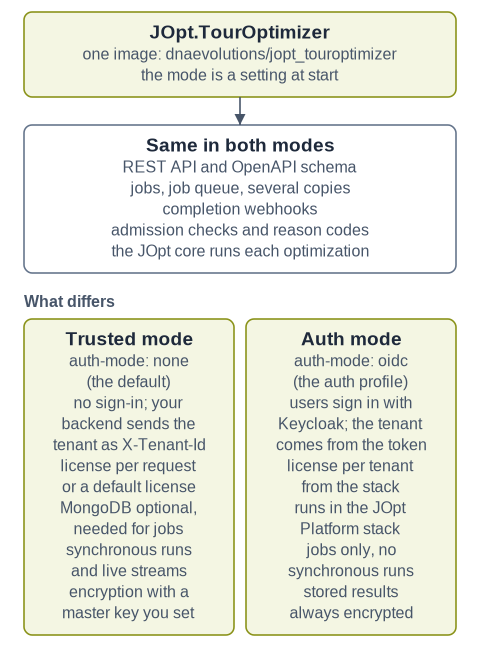
The diagram opens full size on click.
Image and versions
| Item | Value |
|---|---|
| Image | dnaevolutions/jopt_touroptimizer on Docker Hub |
| Image tags | One tag per release with its version number, for example 2.1.0; pin a version tag (Docker Hub tags) |
| Runtime in the image | Java 25, started as a user without root rights |
| API port | 8081 inside the container |
| Optimization library | The Java 25 line of the JOpt core |
| API schema | The OpenAPI schema of each release on the API page |
The mode is not part of the image. It is chosen when the container starts: see Settings.
Same in both modes
| Topic | What TourOptimizer does | Details |
|---|---|---|
| REST API | The same endpoints and the same JSON model; every server serves its own OpenAPI schema | API and clients |
| Jobs | Submit, queue, run, state, progress and result; several copies share one job queue in MongoDB | Jobs |
| Completion webhooks | A message to your URL when a job ends, sent again until your server answers with 2xx | Jobs |
| Admission checks | Checks before a job is stored; a refusal names an HTTP status and a reason code | Checks and limits |
| Run time and keep time | A run stops at its time limit and keeps its best result; a result is deleted after its keep time | Settings |
| Health and metrics | Liveness and readiness checks; metrics on a separate management port when one is set | Settings |
| JOpt core | Every optimization runs in the JOpt core of the Java 25 line | Java 25 line of the JOpt core |
What differs
| Topic | Trusted mode | Auth mode |
|---|---|---|
| How it is chosen | No Spring profile auth (the default) | The Spring profile auth |
| Sign-in | None; restrict access in your network | Users and clients sign in with Keycloak and send a token |
| Tenant | Your backend sends it in the header X-Tenant-Id; TourOptimizer takes it as sent | From a signed claim of the token; a header X-Tenant-Id is replaced |
| JOpt license | With the request, otherwise the default license of the server | Per tenant, from the secret store of the stack |
| Rates and quotas | None | Per tenant, from the plan of the tenant |
| MongoDB | Optional; needed for jobs | Needed, since auth mode runs optimizations only as jobs |
| Synchronous runs, live streams and job import | Available | Not available; jobs only |
| Stored results | Encrypted when you set a master key | Always encrypted |
| Webhook URL check | Your choice: none (the default), relaxed or strict | Always strict |
| Default limits | None unless you set them | Set by the stack and by the plan of the tenant |
| Where it runs | One container or several, on your own servers or in your cloud | In the JOpt Platform stack, with GeoCoderRouter for geo data |
| How to run it | Trusted Mode | JOpt Platform |
Related pages
- API and clients: the REST API, the OpenAPI schema and the generated clients
- Jobs: how a job flows from submit to result
- Checks and limits: the admission checks and the reason codes
- Settings: the settings of both modes
- JOpt.Core overview: the JOpt core, its lines and its use in your own Java application
- Choose a mode: the core in your JVM, trusted mode or auth mode
Added: 2026-11-27 | Last updated: 2026-11-27
Legacy Distance and Time Matrix: LegacyDistanceMatrixAndTimeMatrixExample
This example shows the legacy way to pass precomputed distances and driving times to the optimizer: as a distance matrix and a time matrix, with a matrix index on each node. The methods it uses are deprecated in the current core. For new code, use a node connector instead (see ExternalNodeConnectionExample); the toString() of the example says the same: "Defining a time and distance matrix. (Legacy - use NodeConnector instead)".
API and clients
The REST API of JOpt.TourOptimizer, its OpenAPI schema, the JSON model of an optimization and the generated example clients.