Choose how to run JOpt
JOpt runs in one of three ways. The Java SDK runs the JOpt core inside your own Java application. JOpt.TourOptimizer runs the same core as a REST server in a container, in one of two modes: in trusted mode your backend handles sign-in, tenants and licenses, and in auth mode the JOpt Platform stack does.
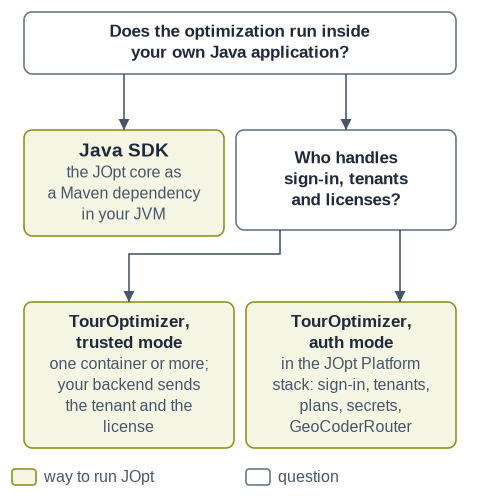
The diagram opens full size on click.
The diagram asks two questions. If the optimization runs inside your own Java application, use the Java SDK. If not, JOpt.TourOptimizer runs as a REST server, and the second question decides the mode: when your backend handles sign-in, tenants and licenses, run TourOptimizer in trusted mode; when the stack handles them, run it in auth mode in the JOpt Platform.
The three ways side by side
| Java SDK | TourOptimizer, trusted mode | TourOptimizer, auth mode | |
|---|---|---|---|
| Where the optimization runs | In the JVM of your application | In the TourOptimizer container | In the TourOptimizer copies of the JOpt Platform stack |
| How a client calls it | Java method calls, no network | REST from any language | REST from any language, with a token |
| Sign-in, tenants and licenses | Your application | Your backend; it sends the tenant in X-Tenant-Id and the license with the job or as the server default | The stack: sign-in with Keycloak, the tenant from the token, the license per tenant from the secret store |
| What you run | Your application with the JOpt core as a Maven dependency | One TourOptimizer container, MongoDB for jobs, more copies as needed | The JOpt Platform stack: TourOptimizer, GeoCoderRouter, Keycloak, MongoDB, Redis, Infisical and the proxy |
| Road distances and driving times | Set by your application; without them JOpt calculates them from the coordinates (backup connector) | Sent by your backend with the job; without them JOpt calculates them from the coordinates | From GeoCoderRouter in the stack, which also geocodes addresses |
| Where to start | Getting started: Java SDK | Trusted Mode | JOpt Platform |
The two modes of TourOptimizer use one image, one REST API and one JSON model. The Spring profile auth chooses auth mode; without it TourOptimizer runs in trusted mode. Everything that differs between the modes, such as rates, quotas, synchronous runs and the encryption of stored results, is listed on the JOpt.TourOptimizer overview.
The Java SDK
The Java SDK is the JOpt core as a library. Your application builds the optimization in memory, runs it and reads the result directly, without a network call. The core is published in the public DNA Evolutions Maven repository repo.dna-evolutions.com. The Java examples show how a model is built; Getting started runs the first one, and JOpt.Core overview lists the lines of the core and their Java versions.
TourOptimizer in trusted mode
Choose trusted mode when your own backend already signs in its users and only that backend calls TourOptimizer. The mode needs no sign-in service, no secret store and no Redis. It runs as one container, with MongoDB for jobs, or as several copies that share one MongoDB. The Trusted Mode section shows the setups on Linux, Windows, macOS and Kubernetes.
TourOptimizer in auth mode
Choose auth mode when users or clients sign in to TourOptimizer itself, or when tenants need plans, quotas and licenses that the stack keeps. Auth mode runs in the JOpt Platform stack, which also brings GeoCoderRouter for geocoding and road distances, JOpt.Solve in the browser and the MCP connector as options. The JOpt Platform section describes the stack and its operations; customers get it through the contact page.
Related pages
- JOpt.TourOptimizer overview: what TourOptimizer does in both modes
- Trusted Mode: TourOptimizer behind your own backend
- JOpt Platform: TourOptimizer in auth mode in the stack
- Getting started: a first run with the Java SDK or with a REST client
Added: 2026-11-27 | Last updated: 2026-11-27