RESTful Examples (Java) — JOpt TourOptimizer
The RESTful examples package demonstrates how to bridge the JOpt Java SDK with the JOpt.TourOptimizer REST API.
These examples are the connecting layer between two worlds: Java-based problem modeling and REST-based optimization execution.
Where this fits in the repository
The examples are organized into four major categories (hosted on GitHub):
Each section has its own README. This README focuses on the RESTful package.
Overview
- Why use the RESTful examples?
- The REST server (backend)
- The sandbox (CodeServer)
- Package structure
- Sub-package:
createinput - Sub-package:
readinput - End-to-end flow
- Running the examples
- Further documentation
Why use the RESTful examples?
JOpt.TourOptimizer is available both as a Java library (SDK) and as a containerized REST service. The RESTful examples package focuses on the interoperability between these two modes:
- Serialize Java → JSON: take a problem built with the Java SDK and convert it into a REST-compatible JSON payload — ready to be submitted to any running TourOptimizer REST endpoint.
- Deserialize JSON → local run: take a REST JSON payload (produced by the SDK, the Swagger UI, or an external client) and execute it locally using the Java core library — no REST server needed.
These patterns are valuable in real projects for debugging, hybrid architectures, integration testing, and warm-start optimization workflows.
The REST server (backend)
The JOpt.TourOptimizer REST server is a reactive Spring WebFlux application exposing the optimizer via REST + OpenAPI (Swagger UI). It is distributed as a Docker image and can be started with a single command.
docker run -d --rm --name jopt-touroptimizer \
  -p 8081:8081 \
  -e SPRING_PROFILES_ACTIVE=cors \
  dnaevolutions/jopt_touroptimizer:latest
Once running, the Swagger UI is available at:
http://localhost:8081/swagger-ui/index.html
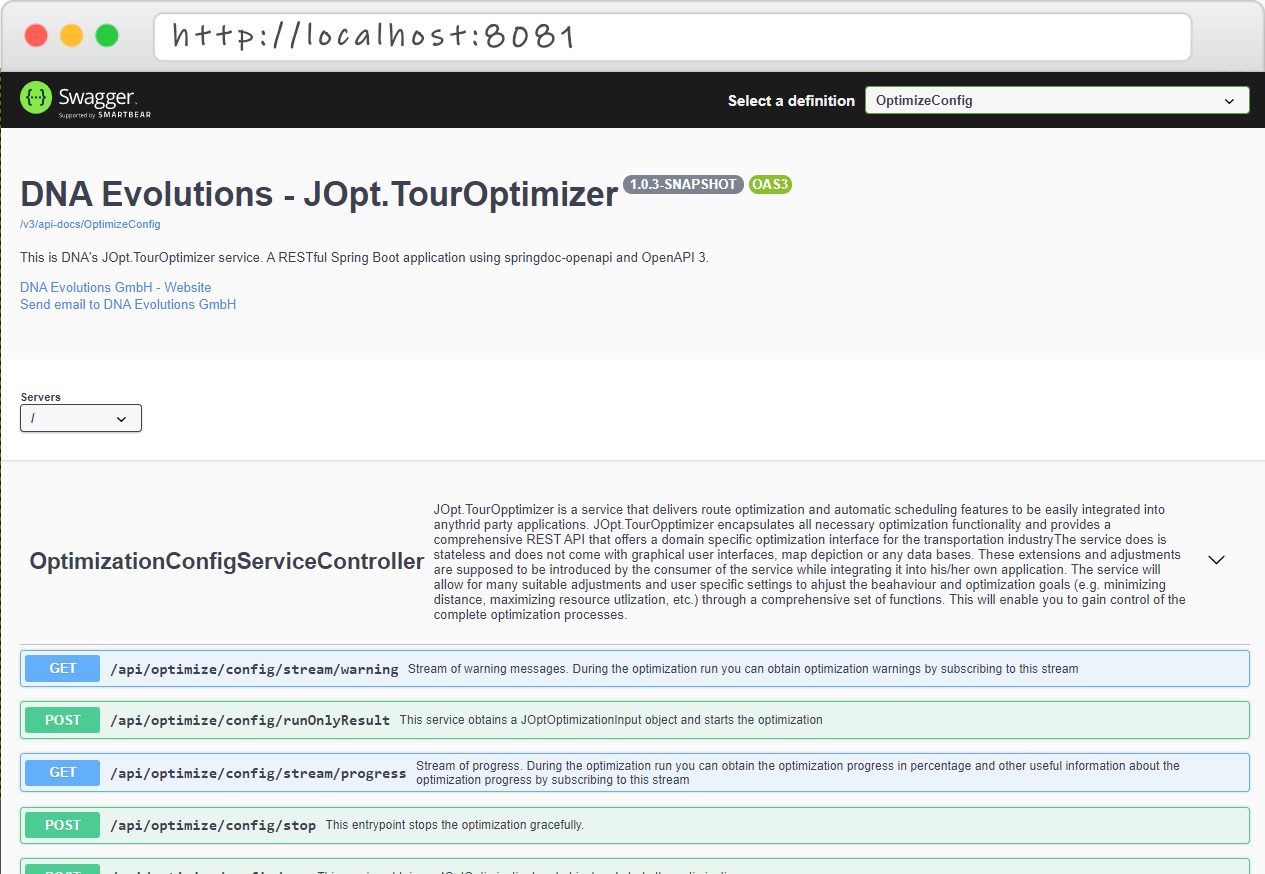
Swagger Endpoint UI — paste any JSON produced by the createinput examples here to run a manual test.
The JSON produced by the createinput examples in this package is directly compatible with the following REST endpoints:
| Endpoint | Description |
|---|---|
/api/optimize/config/run | Start optimization and stream progress + result |
/api/optimize/config/runOnlyResult | Start optimization and return only the final result |
Docker networking note: If you run a REST client inside a sandbox container and the TourOptimizer REST server runs on your host, use
http://host.docker.internal:8081— nothttp://localhost:8081.
For full server documentation, deployment guides (Linux, Windows, macOS, Kubernetes, Terraform), and Fire & Forget mode, see:
The sandbox (CodeServer)
If you want to run these examples in a browser-based IDE without any local Java/Maven/IDE setup, the repository provides a Docker-based CodeServer sandbox:
docker run -it -d --name jopt-java-sandbox \
  -p 127.0.0.1:8042:8080 \
  -v "$PWD/:/home/coder/project" \
  dnaevolutions/jopt_example_server:latest
Open http://localhost:8042 in your browser and log in with password jopt. The full repository is available inside the browser IDE — run any *Example.java with a main(...) method directly.
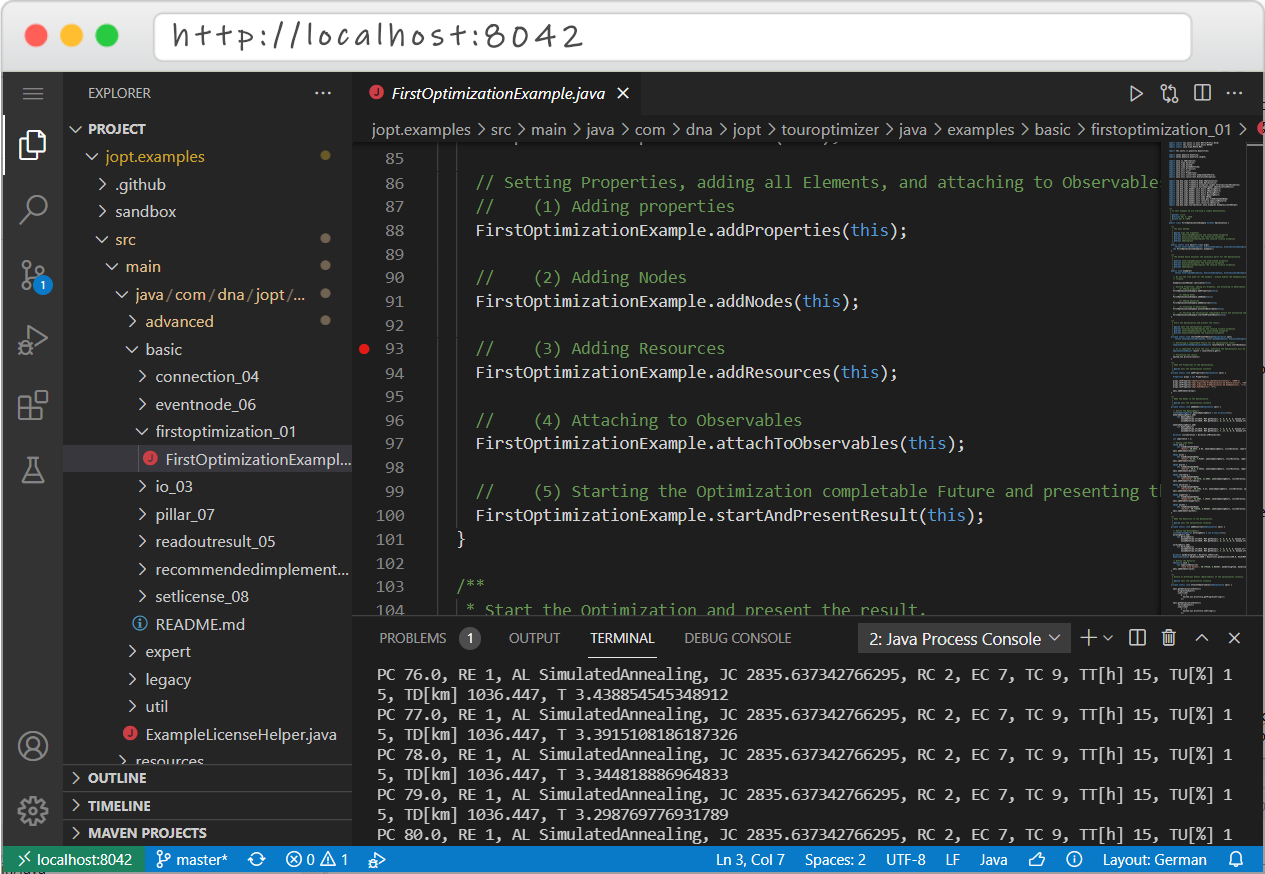
CodeServer Sandbox — run Java examples directly in the browser, no local tooling required.
Resource recommendation: allocate at least 2–4 GB RAM and 2 CPU cores to the sandbox container for a smooth experience.
For the full sandbox guide including REST-client sandboxes (Java, Python, C#) and quickstart tables, see:
Package structure
The restful package contains two sub-packages:
restful/
├── createinput/     ← Java optimization → REST-compatible JSON
│   ├── CreateRestTourOptimizerInputWithoutSolutionExample.java
│   └── CreateRestTourOptimizerInputWithSolutionExample.java
│
└── readinput/       ← REST JSON payload → local optimization run
    ├── ReadJsonConfigAndRunExample.java
    └── JSONInputProvider.java
The two sub-packages represent opposite directions of the same serialization bridge — together they form a complete round-trip from Java model to JSON and back.
Sub-package: createinput — Java → JSON
Package: createinput
Companion doc: CreateRestTourOptimizerInput.md
This sub-package answers the question: "I have an optimization problem built in Java — how do I turn it into a JSON payload the REST server can accept?"
Examples
CreateRestTourOptimizerInputWithoutSolutionExample
Serializes a freshly constructed optimization (nodes + resources, no prior run) to JSON. Use this when:
- you want to submit a new, unsolved problem to the REST server,
- you are generating payloads for manual testing via Swagger UI,
- you are building CI/CD test fixtures.
CreateRestTourOptimizerInputWithSolutionExample
Runs the optimization locally first, then serializes the post-run state (problem + solution) to JSON. Use this when:
- you want the REST server to continue improving a locally found solution (warm start),
- you use Java as a pre-solver and the cloud/REST server for longer refinement runs,
- you want to benchmark local vs. REST results starting from the same initial solution.
Core pattern
Both examples converge on the same reusable serialization helper:
public static String jsonFromOptimization(IOptimization opti)
        throws IOException, ConvertException, SerializationException {

    String licenseKey = "YOUR_JSON_LIC"; // Replace with your JSON license key

    Duration timeOut = Duration.ofMinutes(10);

    JSONConfig myExtension = JSONConfig.builder()
            .keySetting(OptimizationKeySetting.of(licenseKey))
            .timeOut(timeOut)
            .build();

    return JSONOptimization.asJSON(JSONOptimization.fromOptization(opti, Optional.of(myExtension)));
}
The timeOut value is embedded in the JSON payload and is used by the REST server as the maximum allowed optimization duration.
Warning: Replace
"YOUR_JSON_LIC"with a valid JSON license key. Without a valid license, the optimizer runs in limited/free mode (maximum 10 elements).
Sub-package: readinput — JSON → local run
Package: readinput
Companion doc: ReadJsonConfigAndRun.md
This sub-package answers the question: "I have a REST JSON payload — how do I run it locally using the Java core library?"
Examples
ReadJsonConfigAndRunExample
Deserializes a REST JSON payload into a RestOptimization, converts it to an OptimizationConfig<JSONConfig>, optionally modifies it, and runs it locally using the JSONOptimization engine. Use this when:
- you want to debug a REST-server scenario locally without a running server,
- you want to replay a payload from a file, database, or message queue,
- you want to make targeted modifications to a received config before re-running (e.g., override the timeout, change the run identifier, strip a stale solution).
JSONInputProvider
A utility class holding a hardcoded, self-contained JSON payload as a static constant. It mirrors the same seven-city problem (Koeln, Essen, Dueren, Nuernberg, Heilbronn, Wuppertal, Aachen) and single resource ("Jack from Aachen") used in the createinput examples — making the two sub-packages directly comparable. It requires no external files and makes ReadJsonConfigAndRunExample runnable with zero setup.
Core pattern
// 1) Deserialize JSON to RestOptimization
RestOptimization opti = ReadJsonConfigAndRunExample.jsonToRestOptimization(
        myJsonString, ConfigSerialization.objectMapper());

// 2) Create the engine and attach observables
IJSONOptimization myOpti = new JSONOptimization();
attachToObservables(myOpti);

// 3) Convert to OptimizationConfig and optionally modify (immutable copy pattern)
OptimizationConfig<JSONConfig> config = opti.asConfig();
config = config.withIdent("MyModifiedRun"); // example modification

// 4) Run and wait for result
OptimizationConfig<JSONConfig> result =
        myOpti.startAsynchConfigFuture(config, Optional.empty()).get();

// 5) Print result as JSON (can be resubmitted or stored)
System.out.println(JSONOptimization.asJSON(result, true));
Important: Always use
ConfigSerialization.objectMapper()— not a plainnew ObjectMapper(). The JOpt-preconfigured mapper has all necessary type resolvers for the polymorphic node/resource/condition hierarchy. A plain mapper will fail on most real payloads.
End-to-end flow
The two sub-packages together form a complete round-trip:
Java IOptimization
        │
        │  JSONOptimization.fromOptization(...)
        │  JSONOptimization.asJSON(...)
        ▼
REST-compatible JSON string
        │
        ├──► Submit to TourOptimizer REST server  (via Swagger UI or REST client)
        │            └── result JSON ◄─────────────────────────────────────┐
        │                                                                   │
        └──► Deserialize locally via RestOptimization / JSONOptimization   │
                     └── run locally, get result ──────────────────────────┘
Common round-trip workflows
Workflow A — Debug a REST scenario locally
- Capture or generate the JSON payload (from
createinputor Swagger UI). - Run
ReadJsonConfigAndRunExamplewith that JSON to reproduce locally. - Attach a debugger and step through the run.
Workflow B — Java pre-solver + REST refinement
- Run
CreateRestTourOptimizerInputWithSolutionExampleto get a warm-start JSON. - Submit the JSON to the REST server at
/api/optimize/config/runwith a longer timeout. - Collect the improved result.
Workflow C — Manual Swagger testing
- Run
CreateRestTourOptimizerInputWithoutSolutionExampleand copy the printed JSON. - Open
http://localhost:8081/swagger-ui/index.html. - Paste the JSON into
/api/optimize/config/runOnlyResultand execute.
Workflow D — Integration test fixture
- Store the JSON from
JSONInputProvider(or a custom payload) as a test resource file. - Deserialize and run it in your
@BeforeEach/@Testmethods. - Assert on result properties (visited nodes, solution status, total distance).
Running the examples
Option A — Run from your IDE (recommended)
- Import the repository as a Maven project.
- Navigate to
restful/createinput/orrestful/readinput/. - Run the
main(...)method of any*Example.java.
Option B — Use the Java SDK sandbox (Docker)
docker run -it -d --name jopt-java-sandbox \
  -p 127.0.0.1:8042:8080 \
  -v "$PWD/:/home/coder/project" \
  dnaevolutions/jopt_example_server:latest
Open http://localhost:8042 — password: jopt.
Option C — Use the Java REST client sandbox (Docker)
For examples that connect to a TourOptimizer REST endpoint:
docker run -it -d --name jopt-rest-examples \
  -p 127.0.0.1:8043:8080 \
  -v "$PWD/:/home/coder/project" \
  dnaevolutions/jopt_rest_example_server:latest
Open http://localhost:8043 — password: joptrest.
You will also need the TourOptimizer REST backend running (see The REST server (backend)).
Further documentation
REST TourOptimizer
- TourOptimizer REST Server docs
- REST Clients for TourOptimizer
- Docker REST TourOptimizer repository
- Swagger / OpenAPI schema
Companion docs (this package)
CreateRestTourOptimizerInput.md— detailed guide forcreateinputReadJsonConfigAndRun.md— detailed guide forreadinput
REST client repositories
Sandboxes and quickstart
Video tutorials
- Java SDK sandbox tutorial
- TourOptimizer as a service (REST) — Part 1
- TourOptimizer as a service (REST) — Part 2
General
Agreement
For reading our license agreement and for further information about license plans, please visit www.dna-evolutions.com.
Authors
A product by DNA Evolutions
https://www.dna-evolutions.com
Uncaught Exception Handling — Fail Fast, Fail Deterministically, and Still Return a Useful Signal
Uncaught exceptions are one of the most expensive classes of production failures in optimization pipelines:
Creating REST TourOptimizer JSON Input from a Java Optimization — JOpt TourOptimizer
This document explains how to translate a Java-defined optimization problem into a valid JSON payload for the JOpt.TourOptimizer REST API.